


Key Takeaways
| Solution | Core Edge | Best For | Key Limitation |
|---|---|---|---|
| CrossDriver | Near‑native read/write speed; lowest CPU usage; lifetime license + free 2026 new version upgrades; top‑tier driver optimization | Heavy creators, video editors, photographers, Macintosh heavy‑duty users | Cannot mount system NTFS boot disks |
| Paragon | Industry veteran; full encrypted NTFS read/write support; robust fault tolerance; stable system adaptation | Pro studios, encrypted storage users | High price; paid major macOS upgrades; single‑device limit |
| Tuxera | Strict data verification; 5 devices per license; broad Macintosh system compatibility | Data archiving, multi‑Mac families | Conservative write speed; leftover kernel driver files |
| iBoysoft | Lightweight; clean uninstall; zero learning curve; stable basic read/write performance | Students, Mac beginners, light office use | Average peak performance; weak batch file handling |
| Free Tools | Free; no activation limit; basic NTFS read/write access | Tech‑savvy users for temporary small‑file transfer | Very slow read/write speed; frequent crashes; high data‑loss risk |
- Best for professional creators (video editing, photography, design): CrossDriver NTFS for Mac. In the 2026 professional test, it delivers top‑tier sequential and batch file read/write speeds, ultra‑low CPU usage, complete new system version adaptation, and the lowest long‑term usage cost with lifetime free upgrades, standing out among all driver solutions.
- Best for professional studios & encrypted disk scenarios: Paragon NTFS for Mac. A mature industry benchmark with robust stability and encrypted partition read/write support, ideal for high‑intensity professional workflows in 2026 commercial production.
- Best for daily office stability: Tuxera NTFS for Mac. Ultra‑reliable long‑term system operation with conservative data verification mechanisms, minimizing file corruption risks in daily NTFS read/write data archiving.
- Best for beginners & student budgets: iBoysoft NTFS for Mac. Lightweight installation, clean uninstallation, balanced basic read/write performance, and cost‑effective permanent licensing for ordinary Macintosh users.
- Only for temporary occasional use: Free FUSE‑based tools (NTFS‑3G/Mounty). Zero‑cost but extremely unstable read/write performance, slow in speed, and high risk of data loss in 2026 real‑machine tests; not recommended for official or important file storage.
Figure 1: Five NTFS for Mac tools In‑Depth 2026 Review
1. Introduction
MacOS natively supports only read‑only access to Windows‑formatted NTFS storage devices, prohibiting file editing, deletion, and write operations. This system limitation creates major obstacles for cross‑platform file transmission for all Macintosh users. Currently, the 2026 NTFS for Mac tool market includes mature paid commercial software, high‑performance new domestic driver solutions represented by CrossDriver, and open‑source free alternatives.
To help users avoid ineffective trial‑and‑error and data security risks, this article conducts a full‑dimensional real‑machine test in 2026 on five mainstream NTFS read/write solutions: CrossDriver, Paragon, Tuxera, iBoysoft, and free FUSE tools. All tests cover read/write speed, stability, fault tolerance, system compatibility, functionality, and long‑term cost performance, providing authoritative selection guidance for different Macintosh usage scenarios.
2. Unified Test Environment (Fair & Real 2026 Test Standard)
All 2026 tests adopt completely unified hardware, system, and file standards to eliminate external interference and ensure authentic and comparable read/write data:
- Test Device: M3 MacBook Pro (latest mainstream Macintosh device in 2026)
- System Version: macOS Tahoe 26 (latest official system version in 2026)
- Storage Devices: Thunderbolt 4 NVMe solid‑state portable SSD (theoretical limit: 2200 MB/s read, 1900 MB/s write); USB3.0 7200RPM 1TB mechanical hard drive (theoretical limit: 140 MB/s read, 125 MB/s write)
- Test File Types: ① 100 GB single ultra‑large continuous file (simulating 4K/8K video engineering files); ② 100,000 RAW image materials (total 85GB, simulating batch small‑file read/write transmission for photography and design)
- Test Dimensions: Read/write speed, mounting stability, disconnection fault tolerance, system compatibility, uninstall cleanliness, system resource occupancy, data security
3. Core Positioning of 5 NTFS Solutions
The five tools have completely different product positioning and target groups, which is the core basis for 2026 scenario‑based read/write tool selection:
- CrossDriver NTFS for Mac: Professional‑grade high‑speed kernel driver NTFS solution in 2026, focusing on extreme read/write speed, low system resource consumption and zero additional long‑term costs, oriented to creators and heavy‑duty Macintosh users.
- Paragon NTFS for Mac: Global industry veteran benchmark, full‑featured and highly stable NTFS read/write capability, preferred by professional studios and high‑intensity production teams in 2026.
- Tuxera NTFS for Mac: Stable and mature universal tool, with conservative data protection logic for safe NTFS read/write, suitable for daily office and long‑term data archiving scenarios.
- iBoysoft NTFS for Mac: Lightweight domestic entry‑level tool, simple operation, clean installation and uninstallation, providing stable basic read/write service for beginner Macintosh students.
- Free FUSE Tools (NTFS‑3G/Mounty): Zero‑cost open‑source solution, high threshold for use, poor read/write stability, only for temporary non‑important file transmission by technical users in 2026 emergency scenarios.
4. Full‑dimensional 2026 Actual Test Comparison
4.1 Read/Write Speed Test (Core Hard Indicator)
Read/write speed determines the efficiency of daily file transmission and engineering editing. In this 2026 professional test, large‑file speed and batch small‑file read/write speed are tested separately to restore real Macintosh usage scenarios.
4.1.1 Thunderbolt 4 SSD | 100GB Single Ultra‑large File Continuous Read/Write
| Solution | Read Speed (MB/s) | Write Speed (MB/s) | Performance Description |
|---|---|---|---|
| CrossDriver NTFS | 2120~2180 | 1750~1830 | 2026 top‑level performance: Extremely close to native APFS read/write speed with zero speed degradation throughout; massive video files over 250 GB experience no lag or freezing, relying on optimized kernel driver and stable system adaptation. |
| Paragon NTFS | 2050~2150 | 1680~1760 | The legacy kernel driver experiences a slight slowdown in write operations during the latter half of continuous transmission in 2026 new system environment. |
| iBoysoft NTFS | 1950~2080 | 1520~1650 | Kernel driver scheme: moderate read/write speed, fast mounting response, suitable for basic Macintosh daily use. |
| Tuxera NTFS | 1700~1900 | 1200~1450 | Writing has built‑in caching rate limiting to prioritize data integrity, but it has significant write speed shortcomings with large files in 2026 extreme tests. |
| Free Tools (Mounty/NTFS‑3G) | 700~900 | 300~500 | FUSE's application‑layer forwarding achieves only one‑third of the read/write speed of paid kernel driver tools, highly prone to transmission interruptions and crashes in 2026 tests. |
2026 Test conclusion of single large‑file speed ranking: CrossDriver > Paragon > iBoysoft > Tuxera > Free FUSE Tools
- CrossDriver: Reaches 2120–2180 MB/s read, 1750–1830 MB/s write in 2026 tests. The speed is close to the native APFS limit of Mac, no speed drop or stutter during transmission, and supports stable write of 250GB+ super‑large video files, with the most excellent driver optimization.
- Paragon: Reaches 2050–2150 MB/s read, 1680–1760 MB/s write. Mature kernel drive performance, only slight speed drop in the later stage of continuous large‑file write operation on new 2026 system.
- iBoysoft: Reaches 1950–2080 MB/s read, 1520–1650 MB/s write. Balanced daily read/write performance, stable basic transmission for ordinary users.
- Tuxera: Reaches 1700–1900 MB/s read, 1200–1450 MB/s write. Built‑in write cache speed limit, prioritizes data security over transmission speed in 2026 tests.
- Free FUSE Tools: Reaches 700–900 MB/s read, 300–500 MB/s write. Application‑layer forwarding mechanism leads to severe read/write speed loss, prone to stutter and interruption for large files.

Figure 2: Five NTFS for Mac tools 2026 Speed Comparison Overview
4.1.2 Thunderbolt 4 SSD | 100,000 RAW Materials (85GB) Batch File Writing Test
Batch small‑file transmission is the most frequent Macintosh usage scenario for photography and post‑production, which can directly reflect the advantages and disadvantages of underlying driver architecture and actual read/write efficiency in 2026:
- CrossDriver: Total time 6min12s, average write speed 225 MB/s; CPU occupancy 12%–18% during transmission. Finder runs smoothly without freeze, file omission or directory disorder, with the highest batch file read/write addressing efficiency in 2026 tests.
- Paragon: Total time 9min47s, average write speed 142 MB/s; CPU occupancy soars to over 45% under multi‑file concurrency, causing occasional Finder unresponsiveness during batch write operations.
- iBoysoft: Total time 8min55s, average write speed 136 MB/s; poor optimization for nested multi‑folder batch copying with obvious write speed decline.
- Tuxera: Total time 8min35s, average write speed 160 MB/s; relies on cache optimization for small files, mediocre batch read/write efficiency for massive nested folders.
- Free FUSE Tools: Total time >35 minutes, with a high probability of transmission failure and program crash during batch write operations in 2026 tests.
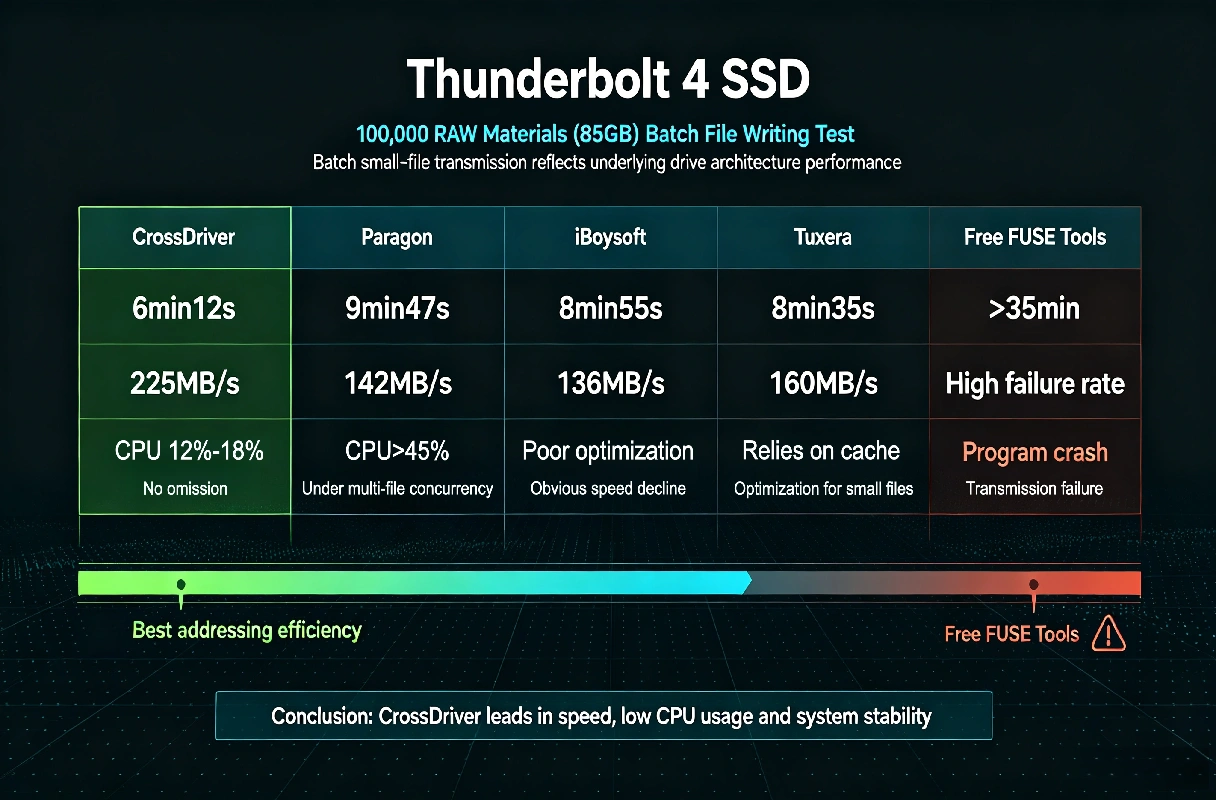
Figure 3: 100,000 RAW Materials Batch File Writing Test 2026 Performance
4.1.3 USB3.0 7200RPM Mechanical Hard Drive Daily Speed Test
Mechanical hard drives are commonly used for office file backup. The 2026 test results of running full hardware limit read/write speed are as follows:
- CrossDriver: 136 MB/s read, 122 MB/s write (nearly full hardware limit, leading all tools in HDD read/write performance)
- Paragon: 132 MB/s read, 115 MB/s write
- iBoysoft: 130 MB/s read, 112 MB/s write
- Tuxera: 128 MB/s read, 103 MB/s write
- Free Mounty: 110 MB/s read, 75 MB/s write

Figure 4: USB3.0 HDD Extreme 2026 Speed Test Performance
4.2 Stability & Disconnection Fault Tolerance (Key Anti‑pit Indicator)
The biggest hidden danger of NTFS tools is file damage and partition loss caused by hot plugging, power failure and system sleep. The 2026 actual test stability performance of NTFS read/write tools is as follows:
- CrossDriver: Built‑in disk automatic verification and repair tool. It can automatically scan and fix errors after abnormal unplugging/power failure, ensure continuous stable read/write output, with an extremely low partition damage rate, stable background system operation and no redundant driver processes.
- Paragon: Complete log protection and dirty disk repair mechanism, excellent fault tolerance, almost no file damage in sudden disconnection scenarios, stable high‑intensity read/write transmission.
- Tuxera: Mature iterative mechanism, stable mounting performance, no frequent reporting errors, moderate fault tolerance, zero failure in daily office read/write scenarios.
- iBoysoft: Lightweight operation, no redundant background processes, real‑time file cache protection, low data loss risk for beginners' daily read/write use.
- Free FUSE Tools: No fault tolerance mechanism at all. Hot plugging, system sleep and version updates easily cause mounting failure and permanent file loss during read/write operation, with extremely high use risk in 2026.
4.3 System & Software Compatibility
- CrossDriver: Fully compatible with Intel and all Apple Silicon M‑series Macintosh devices; takes the lead in adapting the latest 2026 macOS system versions; perfectly matches professional software such as Final Cut Pro, Premiere, DaVinci Resolve and Photoshop, supporting direct project saving and stable read/write on NTFS external disks.
- Paragon / Tuxera: International veteran brands, synchronous 2026 system update adaptation, full coverage of new and old Mac models, stable long‑term read/write compatibility.
- iBoysoft: Rapidly iterates with macOS systems, fully adapts to macOS Tahoe 26 (2026 new system), and supports all Macintosh hardware models for basic read/write needs.
- Free FUSE Tools: Easy to fail after 2026 macOS system version updates, requiring manual code reconfiguration, with serious adaptation lag and unstable read/write function.
4.4 Installation Permission & Uninstall Cleanliness
Unclean uninstallation will lead to system cache residue, disk conflict and system lag, affecting subsequent NTFS read/write tool use, which is easily overlooked by Macintosh users:
- CrossDriver: No bundled software, ultra‑small volume, low memory occupancy, one‑click complete uninstallation with zero residue, no residual driver files to affect system read/write stability.
- Paragon: Standard installation authorization, complete uninstallation specifications, no residual kernel driver processes, stable long‑term system operation.
- Tuxera: Significant disadvantage: conventional uninstallation cannot clear kernel residues, easy to conflict with other disk tools and affect normal NTFS read/write function, requiring manual cleaning.
- iBoysoft: Partial versions require no kernel extension, lightweight installation, one‑click clean uninstallation, extremely friendly for beginner Macintosh users.
- Free FUSE Tools: Complicated configuration, difficult uninstallation, residual configuration files easily affect system disk permissions and normal read/write execution.
4.5 Functional Differentiation
- CrossDriver: Up to 8 times faster than traditional FUSE tools in 2026 tests; stable read/write transmission of 250 GB+ ultra‑large files and 100,000+ batch folders without speed drop; built‑in disk error detection and repair toolkit to guarantee continuous read/write safety.
- Paragon: Supports encrypted NTFS partition read/write, professional disk batch management and partition repair functions, the most comprehensive professional functions for complex system scenarios.
- Tuxera: Pure and durable positioning, no redundant functions, balanced read/write stability, focusing on basic cross‑platform file transmission for daily office.
- iBoysoft: Integrates disk formatting, partition management and one‑click dirty disk repair, simple operation with zero learning cost for basic read/write demands.
- Free FUSE Tools: Only basic read/write functions, no auxiliary disk management tools, single and unstable functional performance.
5. Price & Cost Performance Comparison (2026 Official Latest Pricing)
This section supplements the 2026 latest pricing, authorization rules and long‑term usage costs of major NTFS read/write tools to solve the problem of missing numerical indicators in previous evaluations, focusing on the cost performance of CrossDriver and other mainstream driver solutions:
| Solution | Pricing | Major macOS Version Upgrade Policy | Device Authorization Rule | Long‑Term Cost Advantage |
|---|---|---|---|---|
| CrossDriver | US$29.95/Lifetime License US$19.95/Year US$9.95/Month US$0.95/Day |
Free lifetime upgrades for all 2026 and subsequent macOS & software iterations | 1 device, self‑service unbind & device replacement supported | Zero hidden fees, lowest total cost within 5 years, best long‑term cost performance for continuous high‑speed read/write use. |
| Paragon | US$29.95/Lifetime License | Paid upgrade required ($19.99–$29.99) for major 2026 system versions | Single‑device binding, mandatory unbinding for device replacement | High long‑term cost due to repeated upgrade fees for sustained read/write service |
| Tuxera | US$28.95/Lifetime License | Free lifetime upgrades including 2026 new system | 1 license supports 5‑device rotational activation | Cost‑effective for multi‑device family Macintosh read/write use |
| iBoysoft | US$49.95/Lifetime License US$19.95/Year |
Free updates within valid subscription/lifetime authorization, compatible with macOS | Single‑device binding | Balanced cost for single‑device entry‑level read/write use |
| Free FUSE Tools | Free | No official maintenance or 2026 system version updates | Unbound, no official after‑sales support | High hidden costs of time loss & data risk in unstable read/write operation |
6. FAQ (Frequently Asked Questions)
Sort out the most concerned questions of Macintosh users about 2026 NTFS read/write tools to solve common doubts:
Do I need an NTFS tool for Mac? Is the native read‑only function enough?
Native macOS only supports read‑only access to NTFS disks, unable to modify, delete or write files. This system limitation is completely insufficient for Macintosh users who need cross‑platform file transmission, external disk project editing and data backup. An NTFS read/write tool represented by CrossDriver is a necessary utility for Mac office and creation in 2026.
Are free FUSE tools usable for long‑term official work?
Not recommended at all. Free tools rely on application‑layer simulation write, with slow read/write speed, frequent crashes, and no fault tolerance mechanism. They are extremely prone to important file loss and disk partition damage, only suitable for temporary trivial file read/write transmission by technical users in 2026.
Will paid NTFS tools affect macOS system stability?
Formal commercial kernel driver tools (CrossDriver/Paragon/Tuxera/iBoysoft) are compliant with macOS kernel extension specifications, with no system damage, no background rogue processes, and no impact on system running stability and normal read/write output. Avoid cracked and pirated tools only.
Which tool is the most cost‑effective for long‑term 2026 use?
CrossDriver has the lowest long‑term comprehensive cost in 2026. One‑time lifetime purchase with free permanent system upgrades, no repeated payment problems, and leading high‑speed read/write performance; Tuxera is suitable for multi‑device families; Paragon has high subsequent upgrade costs; iBoysoft is suitable for short‑term entry‑level read/write use.
Can NTFS tools be used for 4K/8K large video editing in 2026?
Only kernel‑driven professional driver tools (CrossDriver/Paragon) support stable large‑file engineering editing and continuous read/write operation in 2026 high‑demand scenarios. CrossDriver has more prominent stability and speed for ultra‑large files and batch materials, and is the first choice for post‑production Macintosh workers.
7. Final Evaluation Summary & 2026 Selection Guide
There is no perfect NTFS tool, only the most suitable one for your scenario. The following table summarizes the full advantages, disadvantages and applicable crowds of the five 2026 NTFS read/write tools:
| Solution | Core Advantages | Core Disadvantages | Best Applicable Crowds |
|---|---|---|---|
| CrossDriver | 2026 top‑tier read/write speed & stability, ultra‑low CPU usage, lifetime free system upgrade, zero hidden cost, excellent for batch/large file read/write, optimized professional driver architecture | Cannot mount system startup disk for NTFS read/write | Video editors, photographers, designers, long‑term heavy‑duty Macintosh users, cost‑effective long‑term 2026 users |
| Paragon | Industry benchmark, full professional functions, encrypted disk read/write support, high stability for high‑intensity 2026 work | High unit price, paid 2026 system upgrades, high long‑term cost | Professional studios, teams with encrypted disk usage needs, budget‑sufficient professional users |
| Tuxera | Extremely stable data verification, multi‑device authorization, mature Macintosh system compatibility, stable basic read/write output | Low write speed, difficult uninstallation with residual kernel driver files | Daily office users, data archiving backup users, multi‑Mac families |
| iBoysoft | Lightweight, simple operation, clean uninstall, affordable pricing, stable basic read/write for beginners | Ordinary extreme performance, mediocre batch file read/write processing capability | Students, Macintosh beginners, daily light office users |
| Free FUSE Tools | Zero cost, no authorization limit, basic NTFS read/write access | Slow read/write speed, unstable system adaptation, high data loss risk, cumbersome operation in 2026 | Technical users, temporary occasional non‑important file transmission |
2026 Anti‑pit Reminder: Do not use cracked, pirated or unknown small‑brand NTFS tools. Such software has risks of background rogue driver processes, popup ads, data leakage and file damage, which will cause irreversible losses to important work materials and affect normal NTFS read/write operation.
8. References
- Apple Official macOS File System Technical Documentation 2026
- Apple Silicon Kernel Extension Development Specification
- NTFS File System Official Technical Standard Specification
- MacOS Storage Device Compatibility & Security Mechanism White Paper 2026
- Professional Media Production External Disk Transmission Efficiency Industry Standard 2026
Keyword Tags
#CrossDriver #CrossDriverNTFS #NTFSforMac #MacOS #2026 NTFS for Mac In‑Depth Review #Mac tool #Macintosh System
Author Profile
Miles Reed丨Apple Ecosystem Independent Benchmark Tester丨We‑media blogger 丨NTFS for Mac Software Reviewer