CrossDriver OmniAll in One · 7-day Pro trial · macOS 12 or later · Apple silicon & Intel

Windows and Linux drives,
all in one app

NTFS, Ext4, XFS, Btrfs, F2FS and ZFS — whatever you plug in, it opens. No juggling separate tools, no remembering which drive uses which format.

Read & write 6 formatsFormat to 6 file systemsOne license for all

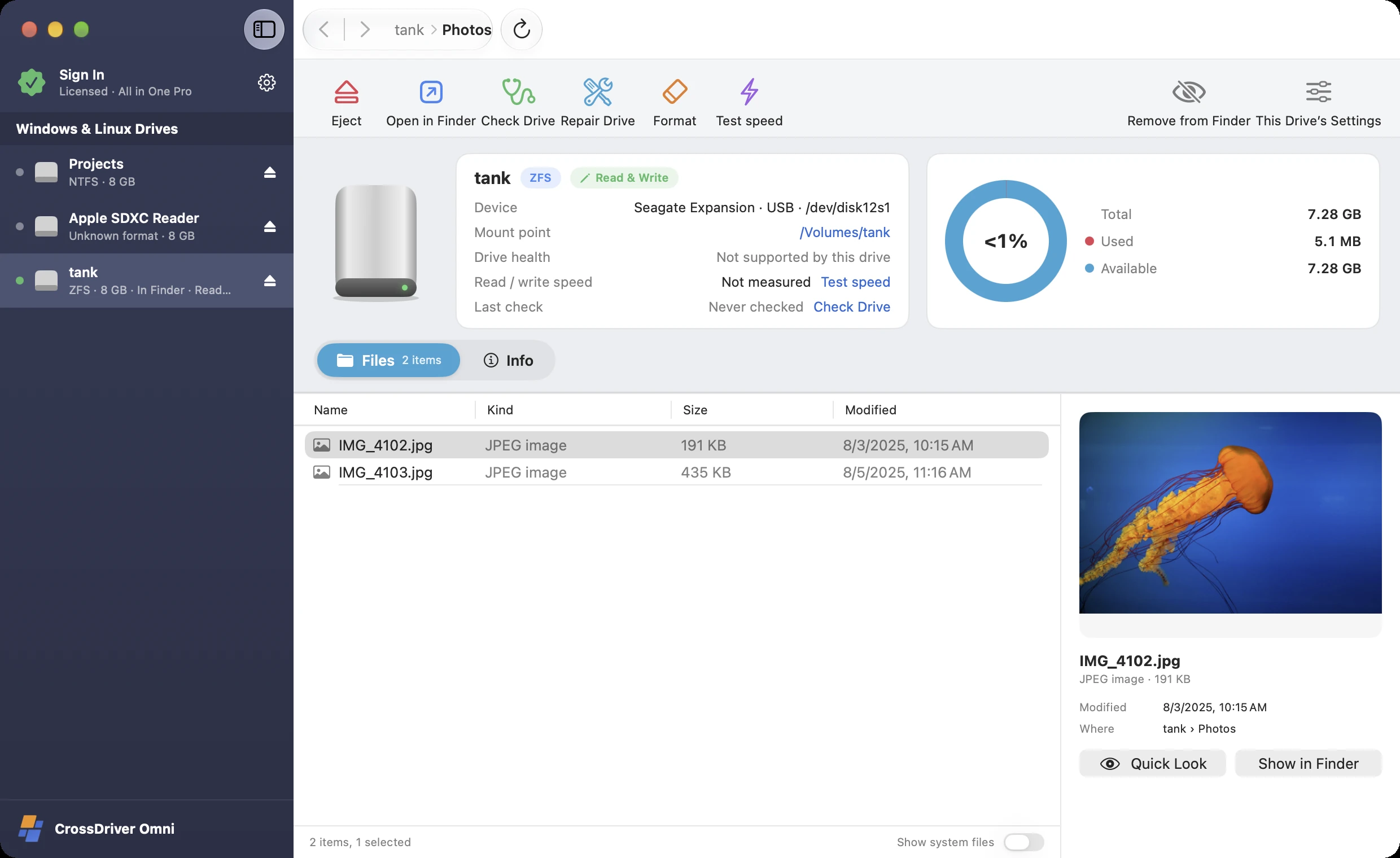
CrossDriver Omni (NTFS / Ext4 / XFS / Btrfs / ZFS for Mac) screenshot: Windows and Linux drives in one sidebar; Automatic format detection; Open in Finder with one click; Instant preview
1Windows and Linux drives in one sidebar
2Automatic format detection
3Open in Finder with one click
4Instant preview

Supported formats

NTFSExt4 / Ext3 / Ext2XFSBtrfsF2FSZFSBitLockerLUKS
01Read & write

Every drive, whatever the format, in one window

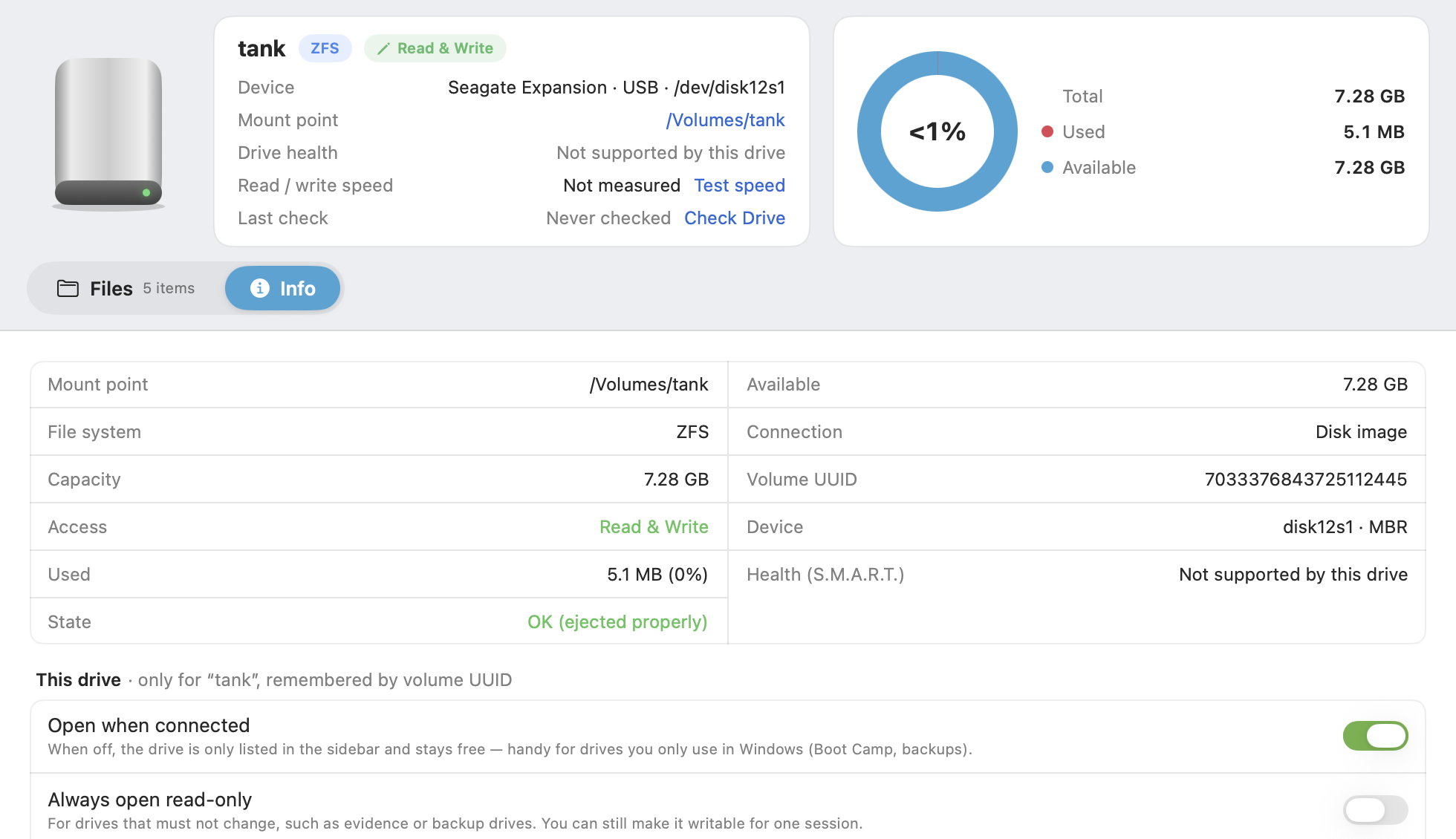
A Windows external drive, a Raspberry Pi SD card, an XFS server disk, a Linux Btrfs backup drive, a ZFS data disk — all lined up in the sidebar, ready with one click.

  • 1Detects each drive's format automatically
  • 2Btrfs, F2FS and ZFS are supported only in All in One
  • 3Click "Eject" so changes are written before you unplug
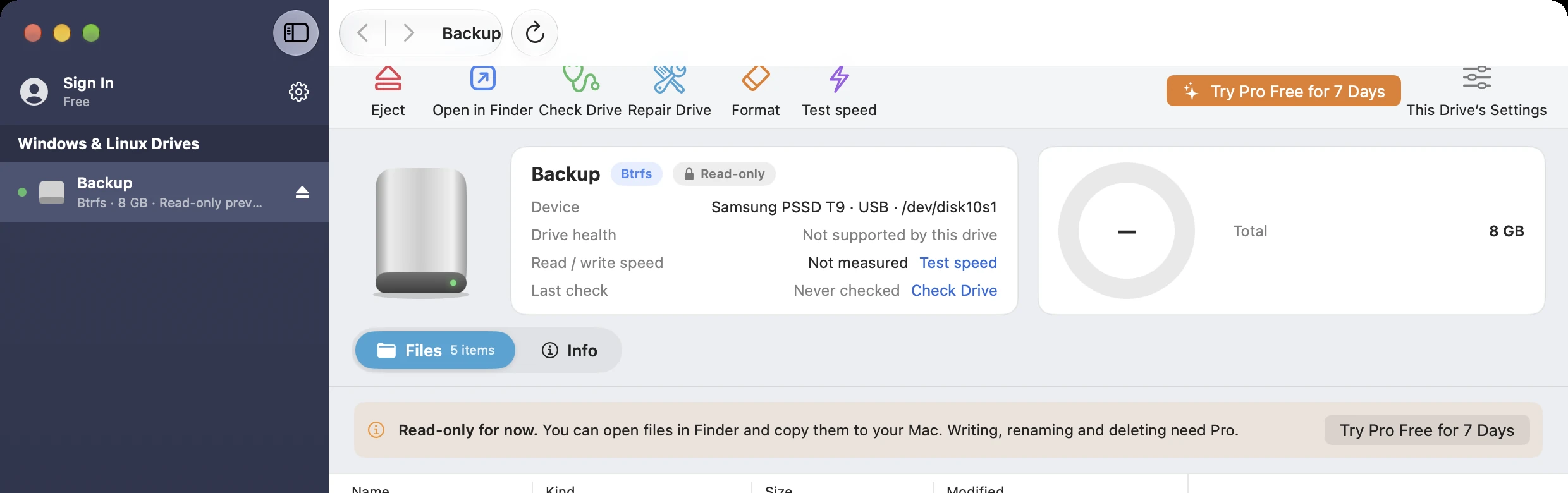
CrossDriver Omni (NTFS / Ext4 / XFS / Btrfs / ZFS for Mac) screenshot: Automatic format detection; Btrfs, F2FS and ZFS are supported only in All in One; Safe eject
1Automatic format detection
2Btrfs, F2FS and ZFS are supported only in All in One
3Safe eject
02Pro

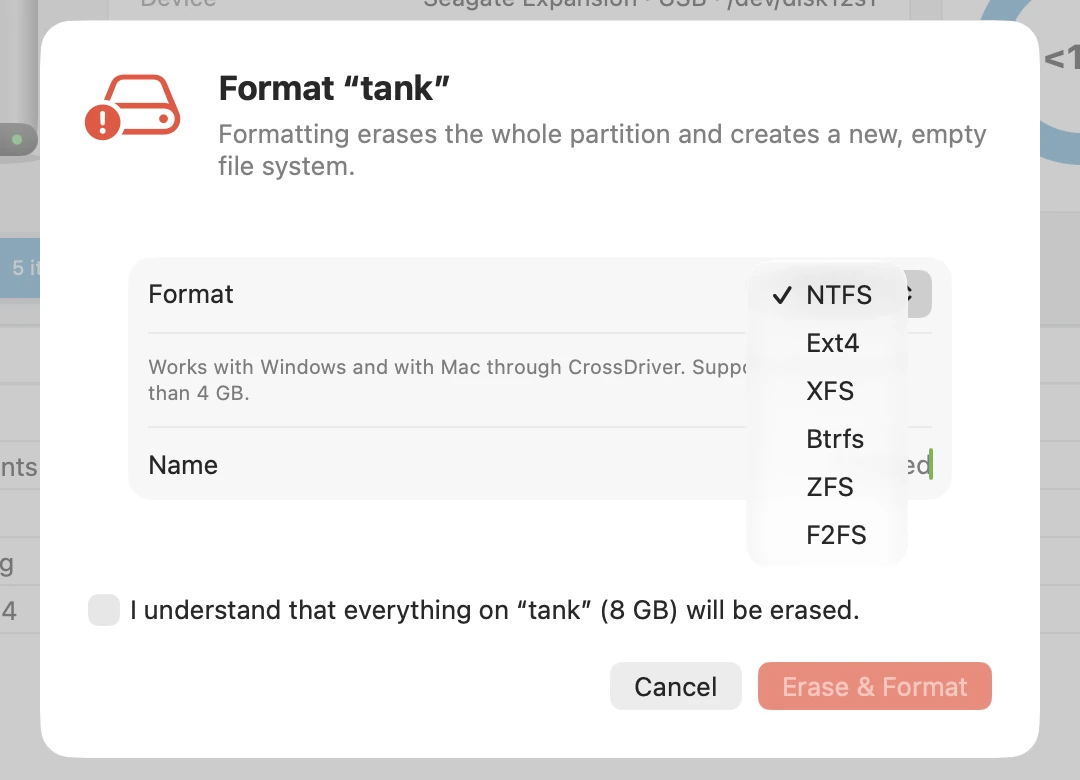
Format as NTFS, Ext4, XFS, Btrfs, ZFS or F2FS

Prepare drives for a Windows PC, Raspberry Pi, server or Android device — all from your Mac.

  • Choose from NTFS, Ext4, XFS, Btrfs, ZFS and F2FS, with what each one is for shown alongside
  • ZFS creates a new single-disk pool with a name you choose
  • Check to confirm before erasing
CrossDriver Omni (NTFS / Ext4 / XFS / Btrfs / ZFS for Mac) screenshot: Six formats to choose from; Check to confirm before erasing
1Six formats to choose from
2Check to confirm before erasing
03Encryption

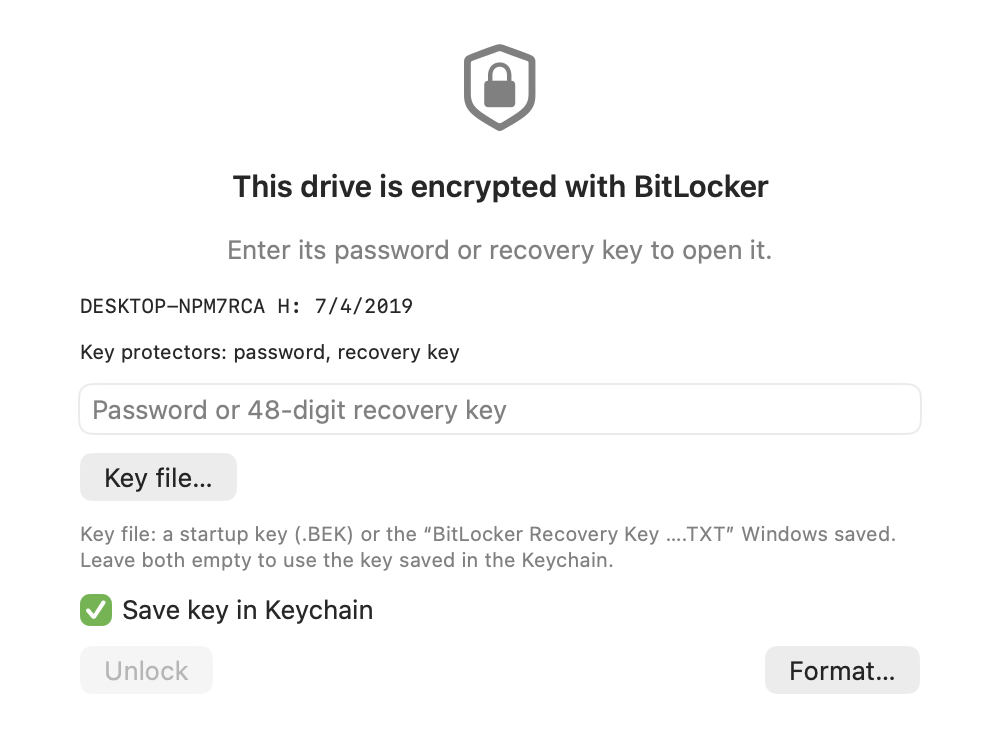
Unlocks both BitLocker and LUKS encrypted drives

Enter the password to unlock Windows BitLocker and Linux LUKS encrypted drives. Read-only in the free version; read-write with Pro.

  • 1Detects BitLocker and key protectors
  • 2Password, 48-digit recovery key or key file
  • 3Can be saved to Keychain
CrossDriver Omni (NTFS / Ext4 / XFS / Btrfs / ZFS for Mac) screenshot: Detects BitLocker and key protectors; Password or 48-digit recovery key; Save to Keychain, unlock automatically next time
1Detects BitLocker and key protectors
2Password or 48-digit recovery key
3Save to Keychain, unlock automatically next time
04Tools

Check, repair and format: all on the Info page

Built-in check and repair for NTFS, Ext4 and XFS — no Terminal required.

  • 1Check (free) and repair (Pro)
  • 2Settings for each drive: open automatically, read-only, show in Finder
CrossDriver Omni (NTFS / Ext4 / XFS / Btrfs / ZFS for Mac) screenshot: Check & repair; Settings for each drive
1Check & repair
2Settings for each drive
Performance

Near kernel-level speed for every format

NTFS, Ext4 and XFS each tested on the same USB 3.2 SSD.

5.5×Ext4 writes vs. traditional user-space tools
4.2×NTFS writes vs. traditional user-space tools
92%of kernel-level speed for XFS reads
Traditional user-space toolsFUSE and other user-space solutionsCrossDriver New GenerationVirtualization engine · no kernel extensionCrossDriver Kernel EditionClassic edition on crossdriver.com · requires lowering system security
Projected figures · to be replaced with measured results before release

NTFS

Sequential readMB/s · Higher is better
Traditional user-space tools
420
CrossDriver New Generation
880
CrossDriver Kernel Edition
960
Sequential writeMB/s · Higher is better
Traditional user-space tools
180
CrossDriver New Generation
760
CrossDriver Kernel Edition
880
Small-file writesfiles/s · Higher is better
Traditional user-space tools
150
CrossDriver New Generation
900
CrossDriver Kernel Edition
1,150

Ext4

Sequential readMB/s · Higher is better
Traditional user-space tools
380
CrossDriver New Generation
900
CrossDriver Kernel Edition
980
Sequential writeMB/s · Higher is better
Traditional user-space tools
150
CrossDriver New Generation
820
CrossDriver Kernel Edition
920
Small-file writesfiles/s · Higher is better
Traditional user-space tools
120
CrossDriver New Generation
1,050
CrossDriver Kernel Edition
1,300

XFS

Sequential readMB/s · Higher is better
Traditional user-space tools
No mature read/write solution yet
CrossDriver New Generation
910
CrossDriver Kernel Edition
990
Sequential writeMB/s · Higher is better
Traditional user-space tools
No mature read/write solution yet
CrossDriver New Generation
850
CrossDriver Kernel Edition
930
Small-file writesfiles/s · Higher is better
Traditional user-space tools
No mature read/write solution yet
CrossDriver New Generation
980
CrossDriver Kernel Edition
1,200

Test setup (illustrative, TBD): MacBook Pro (M3 Pro, macOS 15), Samsung T7 Shield 1 TB (USB 3.2 Gen 2). Sequential read/write uses a single 10 GB file; the small-file test uses 10,000 files of 100 KB each. Each test is run 5 times and the median is reported, with caches cleared beforehand.

View data table
FormatsMetricTraditional user-space toolsCrossDriver New GenerationCrossDriver Kernel Edition
NTFSSequential read (MB/s)420880960
NTFSSequential write (MB/s)180760880
NTFSSmall-file writes (files/s)1509001,150
Ext4Sequential read (MB/s)380900980
Ext4Sequential write (MB/s)150820920
Ext4Small-file writes (files/s)1201,0501,300
XFSSequential read (MB/s)—910990
XFSSequential write (MB/s)—850930
XFSSmall-file writes (files/s)—9801,200

More comparisons & test methodology →

05Compare

How is All in One different from the single-format apps?

All in One includes everything in the three single-format apps, plus support for Btrfs, F2FS and ZFS.

NTFSExt4XFSAll in One
NTFS read/write✓——✓
Ext2 / Ext3 / Ext4 read/write—✓—✓
XFS read/write——✓✓
Btrfs read/write———✓
F2FS read/write———✓
ZFS read/write———✓
FormatNTFSExt4XFSNTFS · Ext4 · XFS · Btrfs · ZFS · F2FS
Unlock encrypted disksBitLockerLUKSLUKSBitLocker · LUKS · ZFS native encryption
Pro license works withNTFSExt4XFSAll four apps
Works with

Which Macs and disks are supported

NTFS, Ext4, XFS, Btrfs, F2FS and ZFS all open in Finder, regardless of drive brand or capacity.

Supported Macs

Models
MacBook Air, MacBook Pro, iMac, Mac mini, Mac Studio, Mac Pro
Chip
Apple silicon (the entire M1–M6 families, including Pro, Max and Ultra) and Intel processors
System
macOS 12 Monterey, 13 Ventura, 14 Sonoma, 15 Sequoia, 26 Tahoe and later

Supported disks

Formats
NTFS, Ext2 / Ext3 / Ext4, XFS, Btrfs, F2FS, ZFS (single-disk pools)
Type
External hard drives, portable SSDs, USB flash drives, SD / microSD cards, and SATA / NVMe drives in an enclosure
Brands
Works with every brand, such as Seagate, WD (Western Digital), Toshiba, Samsung T7 / T9, SanDisk, Kingston, Lexar, LaCie, UGREEN, ORICO and more

Common uses

Mixed Windows and Linux
Open Windows external drives and Linux disks in one app
Linux desktop
Btrfs disks, the default on Fedora, openSUSE and others
ZFS
Single-disk ZFS pools created by TrueNAS, Proxmox and others
Android & embedded
F2FS memory cards and partitions

For NAS storage pools spanning multiple disks, use NAS Rescue.

06Next-gen engine

No kernel extensions.
No changes to your Mac's security settings.

The new-generation CrossDriver reads and writes NTFS, Ext4, XFS, Btrfs, F2FS and ZFS disks using native Linux file system drivers inside an isolated, lightweight Linux environment. Your Mac keeps its factory security level.

✓ No kernel extension

Works right after install

No Recovery mode, no lowering security, no restart — and no broken drivers after a macOS update.

✓ Isolated

A dedicated engine for your disk

The engine only sees the disk you open, fully isolated from macOS and your other disks.

✓ Safe eject

Everything's written before you unplug

When you click "Eject", the engine writes all changes back to the disk before releasing it, so unplugging won't lose data.

All editions require macOS 12 or later and run natively on Apple silicon and Intel.

07Pricing

One license, four apps

An All in One Pro license also covers CrossDriver NTFS, Ext4 and XFS. Try Pro free for 7 days in the app.

Free

US$0

  • Detects and opens all six formats automatically
  • Read-only access in Finder
  • Browse, preview and copy to your Mac
  • Check Disk
  • Unlock encrypted disks read-only
Free download · Includes 7-day Pro trial
Recommended

All in One Pro

US$79.95 Lifetime license · 1 year US$49.95 · 1 month US$24.95

  • Read & write all six formats in Finder
  • Format as NTFS, Ext4, XFS, Btrfs, ZFS, F2FS
  • Repair file systems
  • Read & write encrypted drives
  • License covers the NTFS / Ext4 / XFS apps
Buy Pro

Complete Bundle

US$119.95 Lifetime license · 1 year US$69.95

  • All in One Pro
  • NAS Rescue Pro
  • One license, five apps
Buy the Bundle

Each license covers 1 Mac and can be deactivated in the app to move to another. Works offline, no account required. After-sales & refund policy.

FAQ

Q&A

I already bought NTFS Pro. Can I upgrade to All in One?

Yes. If you've purchased the NTFS, Ext4 or XFS app, contact support and we'll send you a discount code so you only pay the difference.

Can I format drives as Btrfs, F2FS and ZFS?

Yes. All in One Pro can format a drive as NTFS, Ext4, XFS, Btrfs, ZFS or F2FS; choosing ZFS creates a new single-disk pool on the entire drive.

How do I open a Btrfs or ZFS drive on a Mac?

macOS doesn't support Btrfs or ZFS. All in One detects the format automatically: Btrfs drives open directly, and for ZFS it imports the pool on the disk and mounts its datasets. The free version gives read-only access in Finder; Pro adds read-write. If a multi-disk NAS storage pool has failed, use NAS Rescue for read-only recovery.

Can I open a single-disk ZFS pool from TrueNAS or Proxmox on a Mac?

Yes. All in One imports the ZFS pool on the disk and mounts its datasets, with support for ZFS native encryption. Read-only in the free version; read-write with Pro.

How complete is ZFS support?

You can import ZFS pools and read and write their datasets, with support for ZFS native encryption. If a multi-disk pool on a NAS has failed, use NAS Rescue for read-only recovery.

Does it work on M1–M6 Macs? Do I need to disable SIP or install a kernel extension?

Yes, it works — and no, you don't. CrossDriver runs natively on Apple silicon Macs such as M1–M6 as well as Intel Macs, on macOS 12 Monterey, 13 Ventura, 14 Sonoma, 15 Sequoia, 26 Tahoe and later. It uses macOS's built-in virtualization framework to run an isolated, lightweight engine that reads and writes your disks — no kernel extension, no disabling SIP, no changes to any security settings, and no restart after installing.

Can I try Pro first?

Yes. CrossDriver NTFS, Ext4, XFS and All in One all offer a free 7-day Pro trial in the app — once per Mac, no payment details required. After the trial ends, your disks remain accessible read-only and your files are unaffected.

How is it different from the Classic edition on crossdriver.com?

Classic is CrossDriver's kernel edition: it runs as a kernel extension and is the fastest, but requires lowering system security on Apple silicon Macs. The new generation doesn't rely on kernel extensions, runs at near-kernel speed, gives read-only access in Finder even in the free version, and has repair, formatting and encrypted-disk unlocking built in — at two-thirds the price of Classic. Both generations remain available; if you've already bought Classic, please refer to the Classic product page.

One app to open every drive

Download CrossDriver Omni and open your drives for free.

Download for Mac — Free preview

macOS 12 or later · Apple silicon & Intel · Privacy Policy