CrossDriver XFSFree read-only · 7-day Pro trial · macOS 12 or later · Apple silicon & Intel

XFS disks from servers and Unraid,
read & write on your Mac

Multi-terabyte XFS data drives? Plug them into your Mac to browse, copy and edit. The new CrossDriver XFS needs no kernel extension and handles large files with ease.

No kernel extensionNo security downgradeNo restartFree browsing & preview

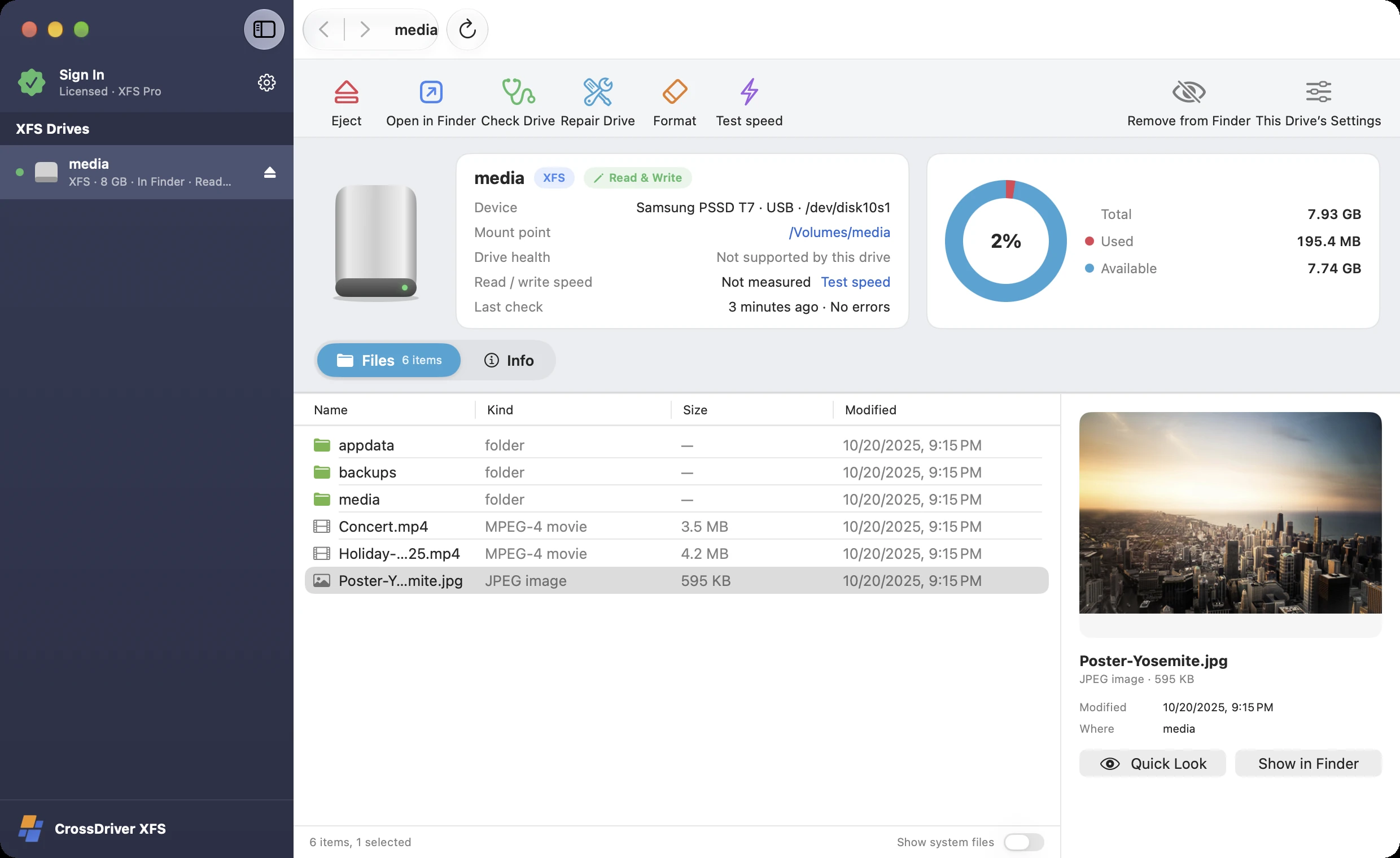
CrossDriver XFS (XFS for Mac) screenshot: Unraid data drives appear when plugged in; XFS · Read & write; Open in Finder with one click; Instant preview
1Unraid data drives appear when plugged in
2XFS · Read & write
3Open in Finder with one click
4Instant preview

Open all of these disks

XFSUnraid data drivesLinux server drivesLUKS-encrypted drives
Use cases

Plug these XFS disks into your Mac and go

XFS is one of the most widely used Linux file systems for servers and high-capacity storage, yet almost no Mac tools can read and write it directly.

🗄

Unraid data drives

Each data drive in an Unraid array is its own file system, so an XFS data drive taken out on its own opens on your Mac.

🖥

Red Hat–family Linux servers

RHEL, Rocky, AlmaLinux and CentOS use XFS by default. Copy data straight from a server's data drive on your Mac.

🎬

Video footage & large files

XFS excels at huge files. Copy footage tens of GB in size right in Finder, and open it directly in your editing app.

🧪

Research & datasets

XFS data drives from lab servers — get your data without logging in to the server.

💾

Linux workstations & backup drives

Take data and backup drives from your Linux workstation home and use them on your Mac.

🔐

Encrypted data drives

LUKS-encrypted XFS disks unlock with your password.

01Pro

Copy videos tens of GB in size, right in Finder

XFS disks appear in Finder and editing apps read footage directly — no need to copy it over first.

  • 1XFS disks appear in the Finder sidebar
  • 2Open and save directly from any app
  • 3Read & write, with free space shown
1Appears in the Finder sidebar
2Edit and save directly from any app
3Read & write, with free space shown
02Free

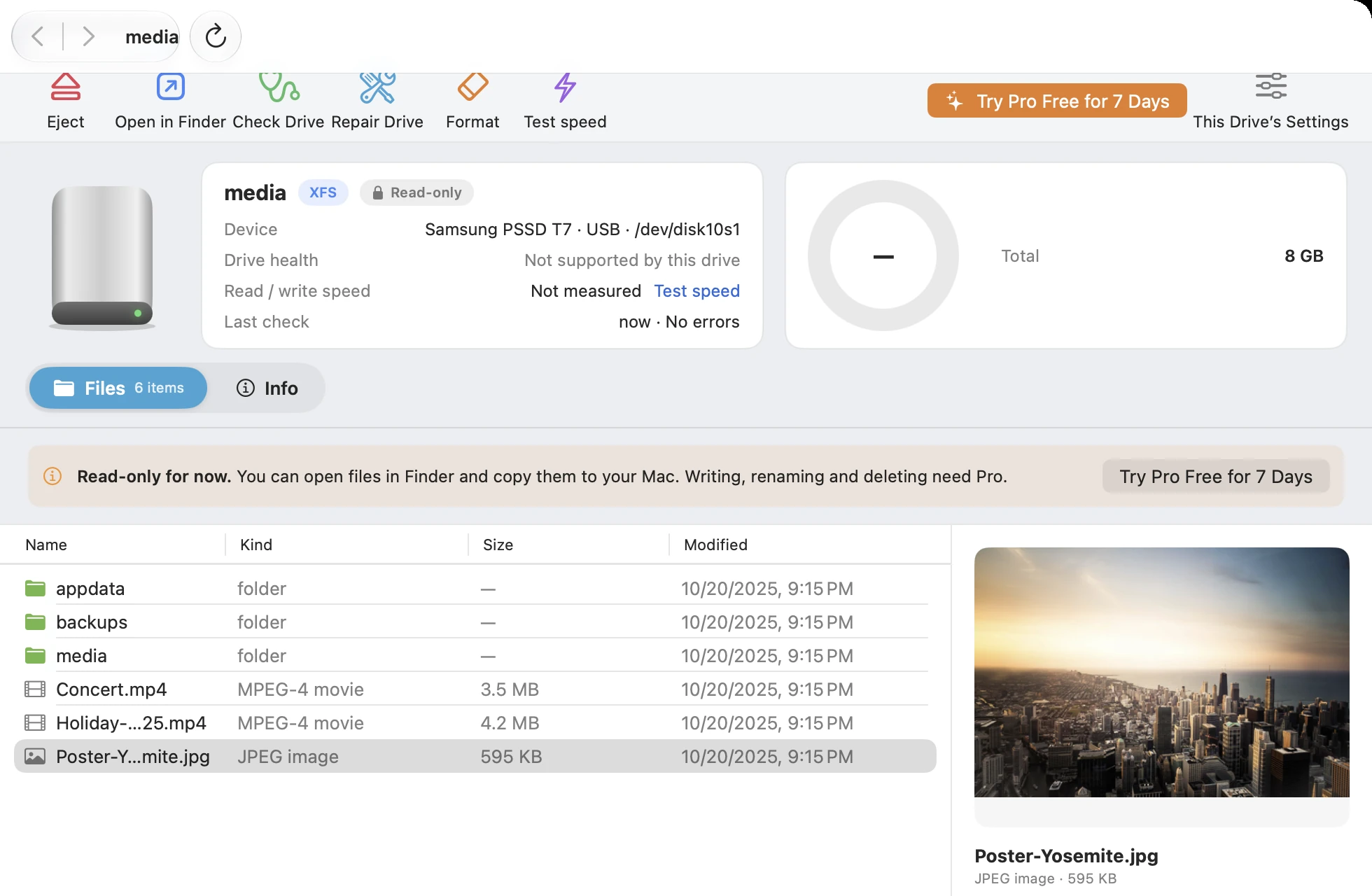
Look first, for free — find the right disk

Got a pile of drives from a server? Open and browse each one with the free version, preview files, and find the one you need first.

  • 1The free version appears in Finder as read-only and never changes the disk
  • 2Select a file to preview it
  • 3Upgrade to Pro when you need to write — or try it free for 7 days first
CrossDriver XFS (XFS for Mac) screenshot: Free version: read-only; Free preview; Pro can write — try it free for 7 days
1Free version: read-only
2Free preview
3Pro can write — try it free for 7 days
03Repair

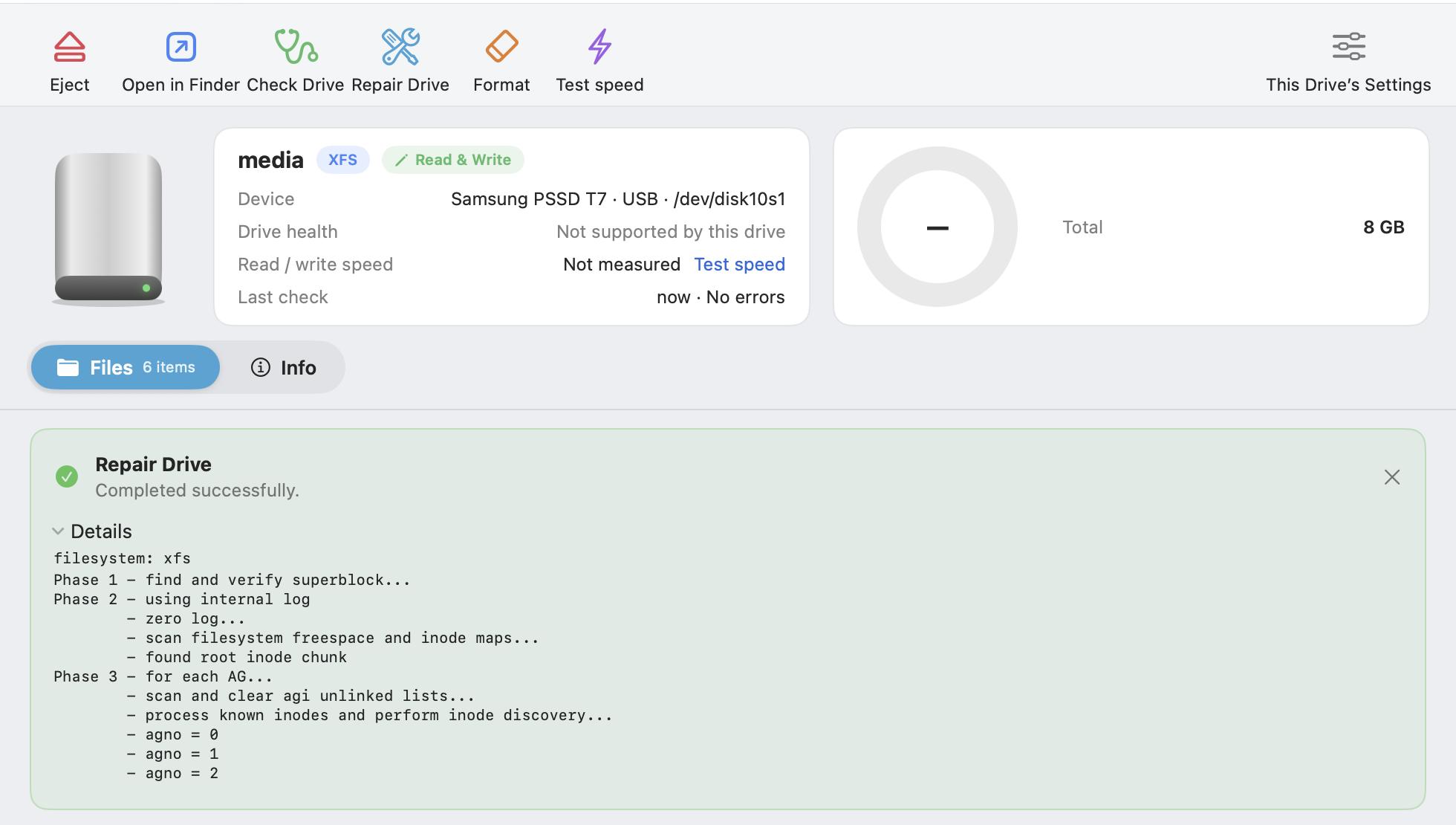
XFS won't mount? Check and repair it

XFS may need repair after an unexpected power loss. CrossDriver has check and repair built in, with clear progress and logs.

  • 1One-click XFS check & repair
  • 2Full logs available
  • 3Reopens by itself after the repair
CrossDriver XFS (XFS for Mac) screenshot: One-click check & repair (xfs_repair); Full logs available; Reopens by itself after the repair
1One-click check & repair (xfs_repair)
2Full logs available
3Reopens by itself after the repair
04Pro

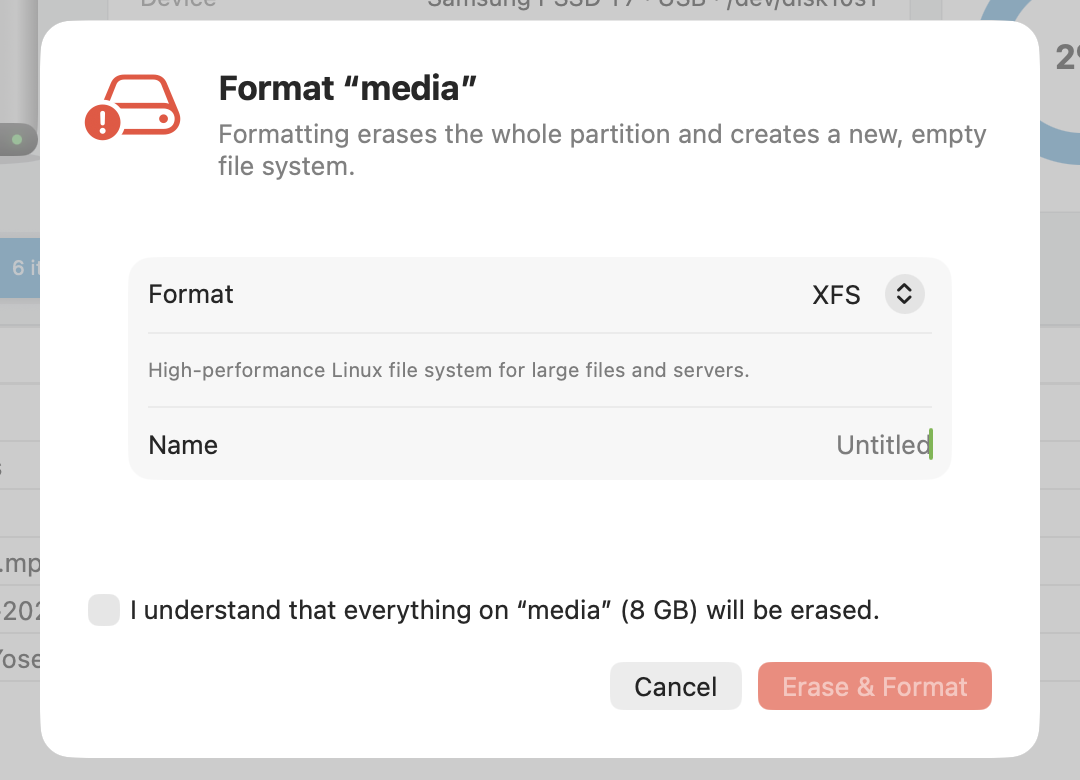
Format disks as XFS on your Mac

Prepare new disks for a server or Unraid, right on your Mac.

  • 1Choose XFS
  • 2What each format is for, shown beside it
  • 3Check to confirm before erasing
CrossDriver XFS (XFS for Mac) screenshot: Choose a format; What each format is good for; Check to confirm before erasing
1Choose a format
2What each format is good for
3Check to confirm before erasing
05Encryption

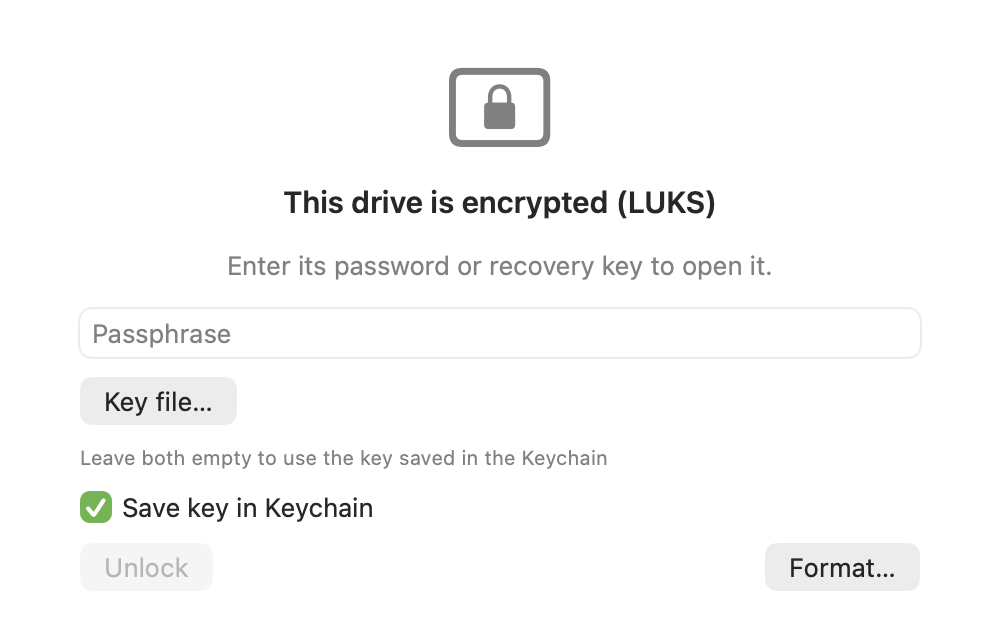
LUKS-encrypted XFS disks open, too

Unlock with your password or a key file. The free version unlocks read-only; Pro can read and write.

  • 1Automatically detects LUKS1 / LUKS2
  • 2Password or key file — either works
  • 3Save to Keychain to unlock automatically next time
CrossDriver XFS (XFS for Mac) screenshot: Detects the encryption type automatically; Enter password; Save to Keychain, unlock automatically next time
1Detects the encryption type automatically
2Enter password
3Save to Keychain, unlock automatically next time
06NAS

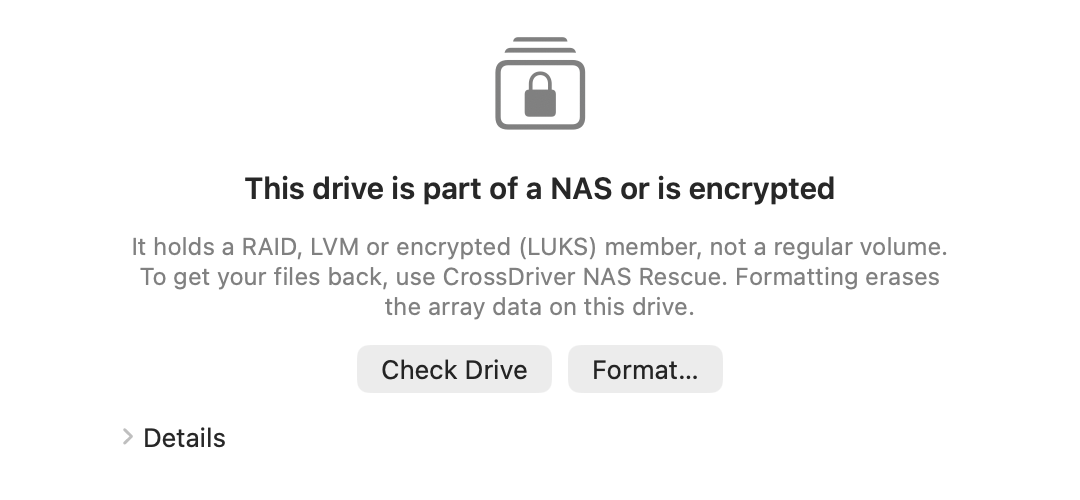
Plugged in a RAID member disk? It'll tell you

Many NAS devices store data on top of RAID or LVM, so a single drive won't show your files. CrossDriver recognizes this and suggests using NAS Rescue instead.

  • 1Recognizes RAID, LVM and encrypted member disks
  • 2Suggests NAS Rescue for a read-only rebuild
CrossDriver XFS (XFS for Mac) screenshot: Recognizes NAS array members; Suggests NAS Rescue instead
1Recognizes NAS array members
2Suggests NAS Rescue instead
Performance

Large XFS files at near-kernel speed

An XFS partition on the same USB 3.2 SSD. There's no mature user-space XFS read/write solution for Mac, so only the new generation and the kernel edition are compared.

92%of kernel-level read speed
91%of kernel-level write speed
Traditional user-space toolsFUSE and other user-space solutionsCrossDriver New GenerationVirtualization engine · no kernel extensionCrossDriver Kernel EditionClassic edition on crossdriver.com · requires lowering system security
Projected figures · to be replaced with measured results before release
Sequential readMB/s · Higher is better
Traditional user-space tools
No mature read/write solution yet
CrossDriver New Generation
910
CrossDriver Kernel Edition
990
Sequential writeMB/s · Higher is better
Traditional user-space tools
No mature read/write solution yet
CrossDriver New Generation
850
CrossDriver Kernel Edition
930
Small-file writesfiles/s · Higher is better
Traditional user-space tools
No mature read/write solution yet
CrossDriver New Generation
980
CrossDriver Kernel Edition
1,200

Test setup (illustrative, TBD): MacBook Pro (M3 Pro, macOS 15), Samsung T7 Shield 1 TB (USB 3.2 Gen 2). Sequential read/write uses a single 10 GB file; the small-file test uses 10,000 files of 100 KB each. Each test is run 5 times and the median is reported, with caches cleared beforehand.

View data table
FormatsMetricTraditional user-space toolsCrossDriver New GenerationCrossDriver Kernel Edition
XFSSequential read (MB/s)—910990
XFSSequential write (MB/s)—850930
XFSSmall-file writes (files/s)—9801,200

More comparisons & test methodology →

Specs

XFS support at a glance

Disks are read and written by the native XFS driver in the Linux 6.18 kernel.

File system

Version
XFS v5 (Linux's default format for the past decade)
Features
Journaling, reflink, bigtime (timestamps beyond 2038), sparse inodes and more
Single file
Up to 8 EiB
Format
XFS

Disks & connections

Connection
USB, Thunderbolt, drive docks
Partition table
GPT · MBR
Encryption
LUKS1 · LUKS2 (password or key file)
Simultaneous disks
One at a time; switching automatically saves and ejects the previous disk

Mac requirements

System
macOS 12 or later
Chip
Apple silicon & Intel
Kernel extension
Not required
Engine
Runs only while a disk is open, using about 512 MB of memory

The older XFS v4 format (deprecated by Linux) is not supported.

Feature compatibility

XFS feature support at a glance

Disks are read and written by the native XFS driver in the Linux 6.18 kernel; repairs use the official xfs_repair.

Opens?Notes
XFS v5 (CRC metadata checksums)✓Default for new XFS file systems on major distributions since around 2015
reflink (fast copies)✓
bigtime (timestamps beyond 2038)✓
sparse inodes · inobtcount · rmapbt✓
POSIX ACLs · extended attributes✓Preserved on disk for Linux to use
XFS v4 (legacy format)—Deprecated by Linux, not yet supported
Compare

How it compares

Until now, these were the only ways to use XFS on a Mac.

CrossDriver XFSMount manually in a Linux VMFind a Linux computerData recovery software
Read & write XFS✓✓✓Mostly read-only extraction
Use directly in Finder✓Requires manual sharing setup——
No command line needed✓——✓
Check & repair (xfs_repair)✓Run manuallyRun manually—
Format as XFS✓Run mkfs manuallyRun mkfs manually—
LUKS-encrypted drives✓Run cryptsetup manuallyRun cryptsetup manuallyVaries by product
Setup timePlug and goInstall and configure a VMRequires another computerJust install
Get started

Get started in three steps

  1. 1

    Download & install

    Download and install for free — no restart, no security changes.

  2. 2

    Plug in your disk

    Your disk appears in the sidebar automatically. Click "Open Disk".

  3. 3

    Browse or read & write

    Browse and copy read-only in Finder for free; upgrade to Pro to write, with a free 7-day trial first.

Works with

Which Macs and disks are supported

If it's XFS v5 (XFS created after around 2015), it opens in Finder — no matter the brand or capacity.

Supported Macs

Models
MacBook Air, MacBook Pro, iMac, Mac mini, Mac Studio, Mac Pro
Chip
Apple silicon (the entire M1–M6 families, including Pro, Max and Ultra) and Intel processors
System
macOS 12 Monterey, 13 Ventura, 14 Sonoma, 15 Sequoia, 26 Tahoe and later

Supported disks

Type
3.5" / 2.5" hard drives and NVMe SSDs pulled from servers and NAS devices (in an enclosure or dock), plus XFS-formatted external drives
Connection
USB-A, USB-C, Thunderbolt, card readers, drive enclosures, drive docks
Brands
Works with every brand, such as Seagate, WD (Western Digital), Toshiba, Samsung T7 / T9, SanDisk, Kingston, Lexar, LaCie, UGREEN, ORICO and more

Common uses

Unraid
XFS data drives taken out of an Unraid array
Linux servers
Data drives from RHEL, Rocky Linux, AlmaLinux and CentOS
Video & large files
Footage and backup images tens of GB in size
Research data
Datasets from lab servers

Whether a disk opens depends only on its format, not on brand or capacity.

Next-gen engine

No kernel extensions.
No changes to your Mac's security settings.

The new CrossDriver reads and writes XFS disks with native Linux file system drivers, running inside an isolated, lightweight Linux environment. Your Mac stays at its factory security level.

✓ No kernel extension

Works right after install

No Recovery mode, no lowering security, no restart — and no broken drivers after a macOS update.

✓ Isolated

A dedicated engine for your disk

The engine only sees the disk you open, fully isolated from macOS and your other disks.

✓ Safe eject

Everything's written before you unplug

When you click "Eject", the engine writes all changes back to the disk before releasing it, so unplugging won't lose data.

All editions require macOS 12 or later and run natively on Apple silicon and Intel.

Pricing

Look for free first, upgrade when you need to write

The free version opens disks read-only in Finder so you can browse, preview and copy to your Mac — with no time limit. Try Pro free for 7 days.

Free

US$0

  • Detects and opens disks automatically
  • Read-only access in Finder
  • Preview photos, videos & documents
  • Copy files to your Mac
  • Check Disk
  • Unlock encrypted disks read-only
Free download · Includes 7-day Pro trial
Recommended

XFS Pro

US$59.95 Lifetime license · 1 year US$39.95 · 1 month US$19.95

  • Everything in Free
  • Read & write in Finder and all apps
  • Repair XFS file systems
  • Format as XFS
  • LUKS-encrypted disk read & write
  • Open in Finder automatically when plugged in
Buy Pro

All in One

US$79.95 Lifetime license · 1 year US$49.95 · 1 month US$24.95

  • Read & write NTFS, Ext4, XFS, Btrfs, F2FS and ZFS
  • Format in six formats
  • License also covers the standalone NTFS / Ext4 / XFS editions
Learn about All in One

Shares a license with the Classic kernel edition (XFS For MAC): on the same Mac, you can use both Classic and the new generation. Each license covers 1 Mac and can be deactivated in the app to move it to another. Works offline, no account required. Support & Refund Policy.

FAQ

Q&A

Can a Mac read XFS drives directly?

macOS doesn't support XFS natively, so when you plug one in you'll see "The disk you attached was not readable by this computer." Click "Ignore". Once CrossDriver XFS is installed, XFS disks appear in the sidebar; the free version lets you browse and copy read-only in Finder, and Pro adds writing, repair and formatting. For the steps, see How to open Ext4, XFS and other Linux drives on a Mac.

Can it open XFS from older servers?

XFS created by default on major distributions since around 2015 (v5 format) opens fine. The older v4 format has been deprecated by Linux and isn't supported yet.

What tool does check and repair use?

It's xfs_repair, the official Linux tool — exactly the same as running it on a Linux server, with progress and full logs visible.

Are reflink and bigtime supported?

Yes. Disks are read and written by the Linux kernel's native XFS driver.

How many disks can I open at once?

One at a time for now. When you switch to another disk, the current one is saved and ejected first.

After writing to an Unraid data drive on a Mac, can I put it back in the array?

Yes, but writing outside the array leaves the parity drive out of sync with the data drive, so run a Parity Check after you put it back. If you just need to retrieve files, opening it read-only with the free version is enough.

Can I open Unraid data drives directly?

Yes. Each data disk in an Unraid array has its own independent file system, so an XFS data disk can be opened on its own with CrossDriver XFS. The parity disk has no file system and doesn't need to be opened.

Does it work on M1–M6 Macs? Do I need to disable SIP or install a kernel extension?

Yes, it works — and no, you don't. CrossDriver runs natively on Apple silicon Macs such as M1–M6 as well as Intel Macs, on macOS 12 Monterey, 13 Ventura, 14 Sonoma, 15 Sequoia, 26 Tahoe and later. It uses macOS's built-in virtualization framework to run an isolated, lightweight engine that reads and writes your disks — no kernel extension, no disabling SIP, no changes to any security settings, and no restart after installing.

Can I try Pro first?

Yes. CrossDriver NTFS, Ext4, XFS and All in One all offer a free 7-day Pro trial in the app — once per Mac, no payment details required. After the trial ends, your disks remain accessible read-only and your files are unaffected.

How is it different from the Classic edition on crossdriver.com?

Classic is CrossDriver's kernel edition: it runs as a kernel extension and is the fastest, but requires lowering system security on Apple silicon Macs. The new generation doesn't rely on kernel extensions, runs at near-kernel speed, gives read-only access in Finder even in the free version, and has repair, formatting and encrypted-disk unlocking built in — at two-thirds the price of Classic. Both generations remain available; if you've already bought Classic, please refer to the Classic product page.

What should I do before unplugging?

Click "Eject" in the sidebar or on the disk page. CrossDriver writes your changes back to the disk first, then lets you know it's safe to unplug.

If I buy All in One, do I still need to buy NTFS, Ext4 or XFS separately?

No. An All in One Pro license also covers CrossDriver NTFS, Ext4 and XFS.

Does it work with Seagate, WD (Western Digital), Toshiba, Samsung T7, SanDisk and other brands?

Yes. Whether a disk opens depends only on its format, not on brand, capacity or connection: external hard drives, portable SSDs, USB flash drives, SD cards, and SATA / NVMe drives in an enclosure all work, over USB or Thunderbolt.

XFS drives, ready to use on your Mac

Download CrossDriver XFS and open your drives for free.

Download for Mac — Free preview

macOS 12 or later · Apple silicon & Intel · Privacy Policy