CrossDriver for Linux DisksWindows edition · Free version, no time limit · 7-day Pro trial

Linux drives,
read and written directly on Windows

Raspberry Pi SD cards, drives from Linux PCs and servers, Unraid data drives: plug them into a Windows PC and they appear in File Explorer as drive letters, read and written with native Linux drivers. Ext4, XFS and Btrfs are all supported, LUKS-encrypted drives open with their password, and if something's wrong, one click checks and repairs it.

Ext4 · XFS · Btrfs · LUKSCheck, repair and formatNo kernel driver

CrossDriver for Linux Disks (Ext4 / XFS / Btrfs for Windows (read Linux drive on Windows)) screenshot: Detects Ext4, XFS, Btrfs when plugged in; Drive letters in File Explorer; One-click check and repair; Instant preview
1Detects Ext4, XFS, Btrfs when plugged in
2Drive letters in File Explorer
3One-click check and repair
4Instant preview

Supported formats

Ext4 / Ext3 / Ext2XFSBtrfsLUKS encryptionRaspberry Pi FAT32 boot partition
Use cases

Linux drives, no Linux PC needed

🍓

Raspberry Pi

Edit and copy the programs, settings and photos on the SD card right on a Windows PC.

🖥

Linux PCs and servers

Ext4 and XFS drives taken out of them, read and written on a Windows PC.

🗄

Unraid data drives

A single XFS / Btrfs data drive from an Unraid array reads fine on its own.

🔐

LUKS-encrypted drives

Drives set up with "Encrypt the disk" when installing Ubuntu or Fedora open with their password.

01Read & write

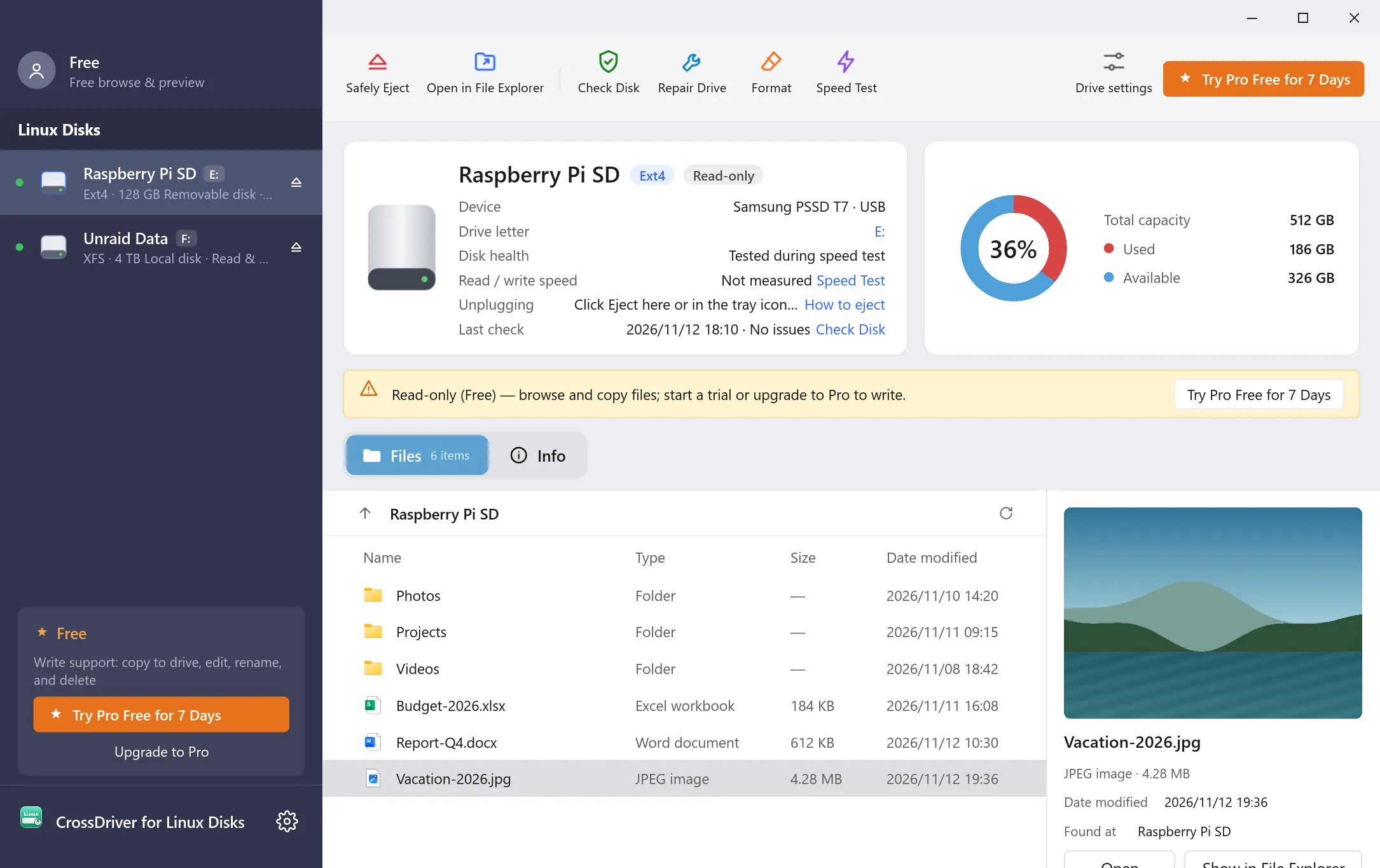
Drive letters in File Explorer: read-only for free, read-write with Pro

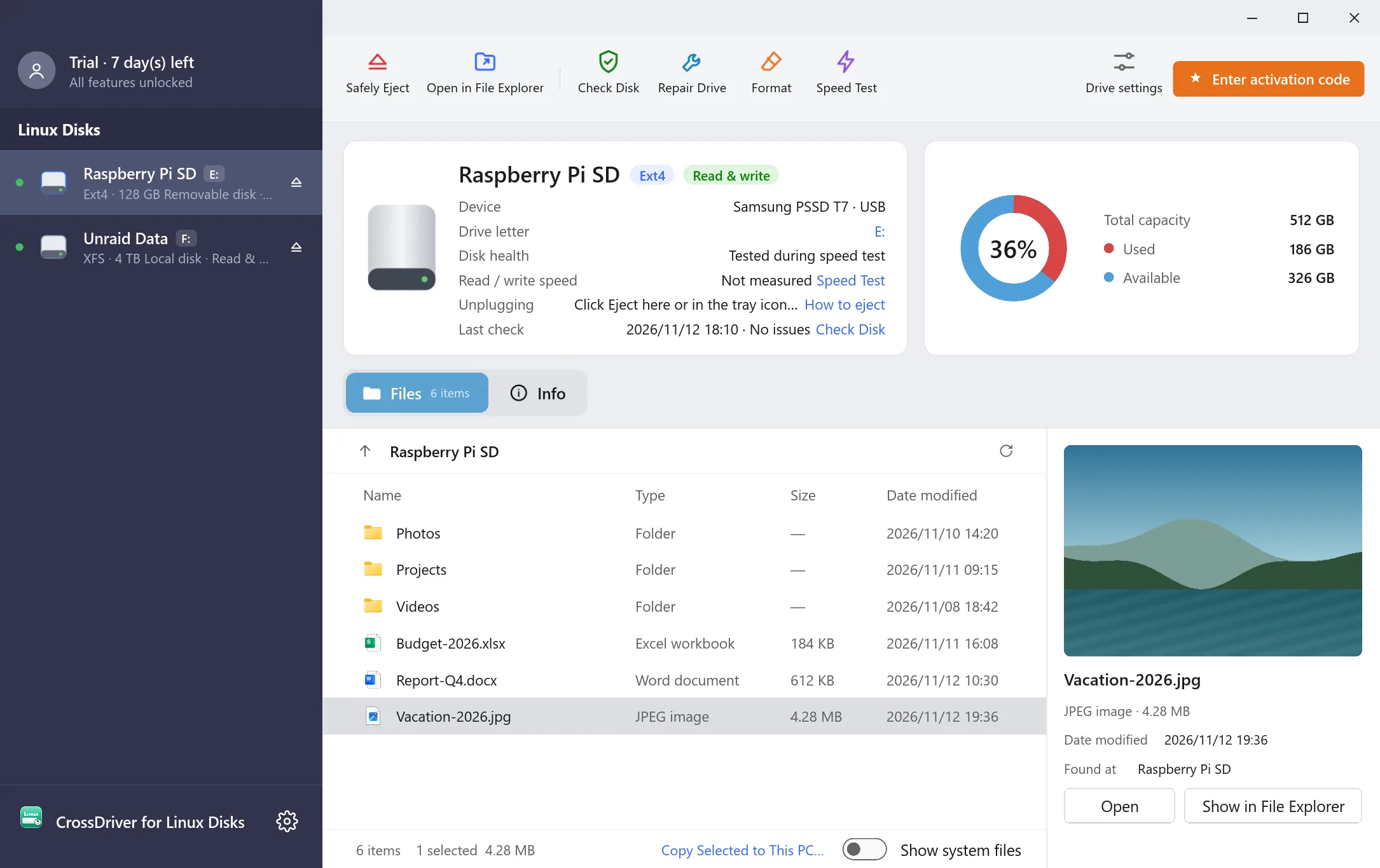
for Linux Disks reads and writes drives with native Linux file system drivers and hands the volumes to File Explorer as drive letters. The free edition can open files and copy them to this PC; writing, renaming and deleting need Pro.

  • 1Free: read-only access
  • 2Drive letters in File Explorer
  • 3Try Pro free for 7 days
  • 4Free preview
CrossDriver for Linux Disks (Ext4 / XFS / Btrfs for Windows (read Linux drive on Windows)) screenshot: Free: read-only access; Drive letters in File Explorer; Try Pro free for 7 days; Free preview
1Free: read-only access
2Drive letters in File Explorer
3Try Pro free for 7 days
4Free preview
02Repair

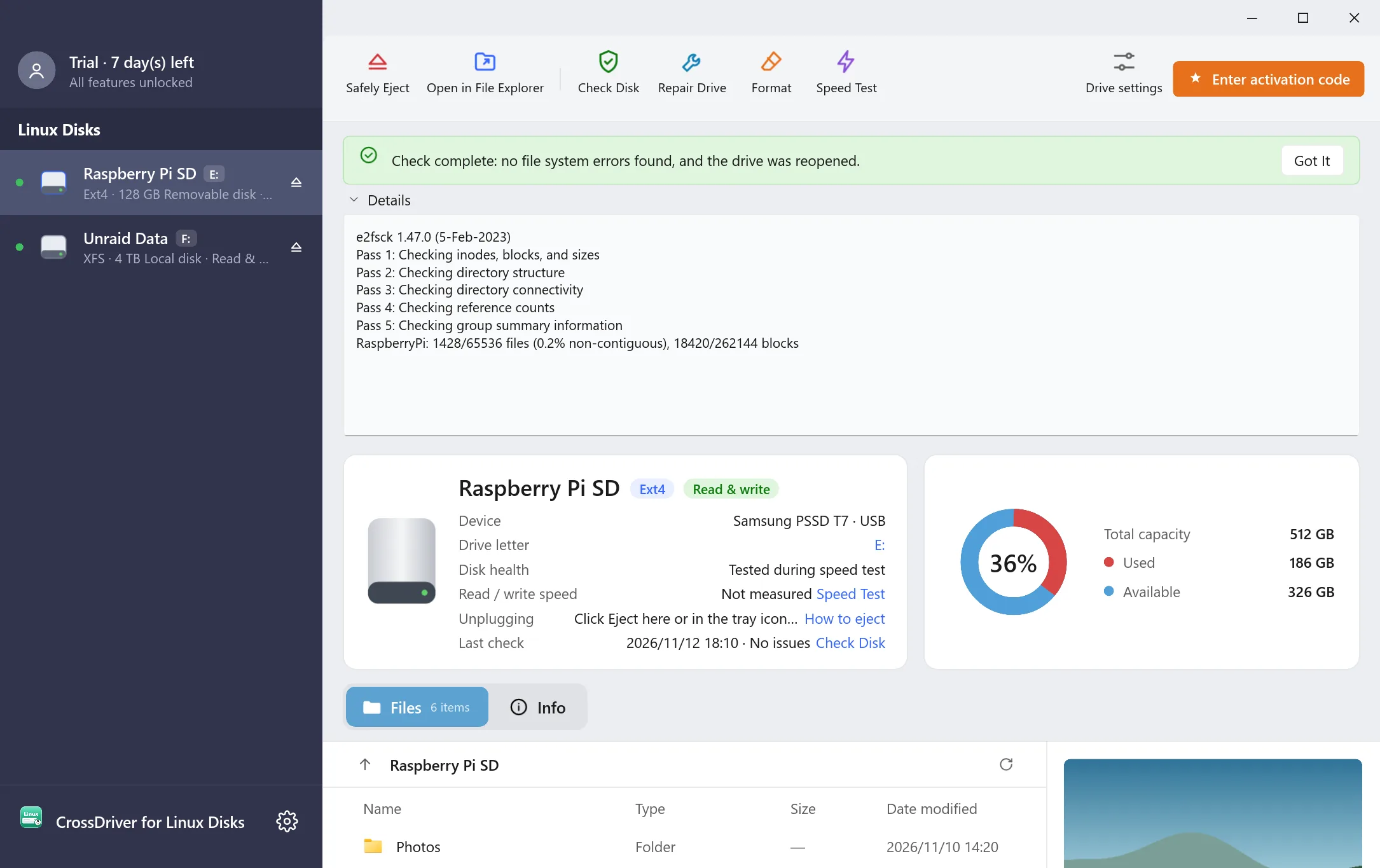
One-click check and repair, remounted automatically when fixed

Unplugged without ejecting, or lost power? Ext4 and XFS checking and repair are built in (e2fsck, xfs_repair) — no need to find a Linux PC and type commands.

  • 1One-click check & repair (e2fsck)
  • 2Remounted automatically after repair
  • 3Full logs available
CrossDriver for Linux Disks (Ext4 / XFS / Btrfs for Windows (read Linux drive on Windows)) screenshot: Check and repair in one click; Remounted automatically after repair; Full logs available
1Check and repair in one click
2Remounted automatically after repair
3Full logs available
03Encryption

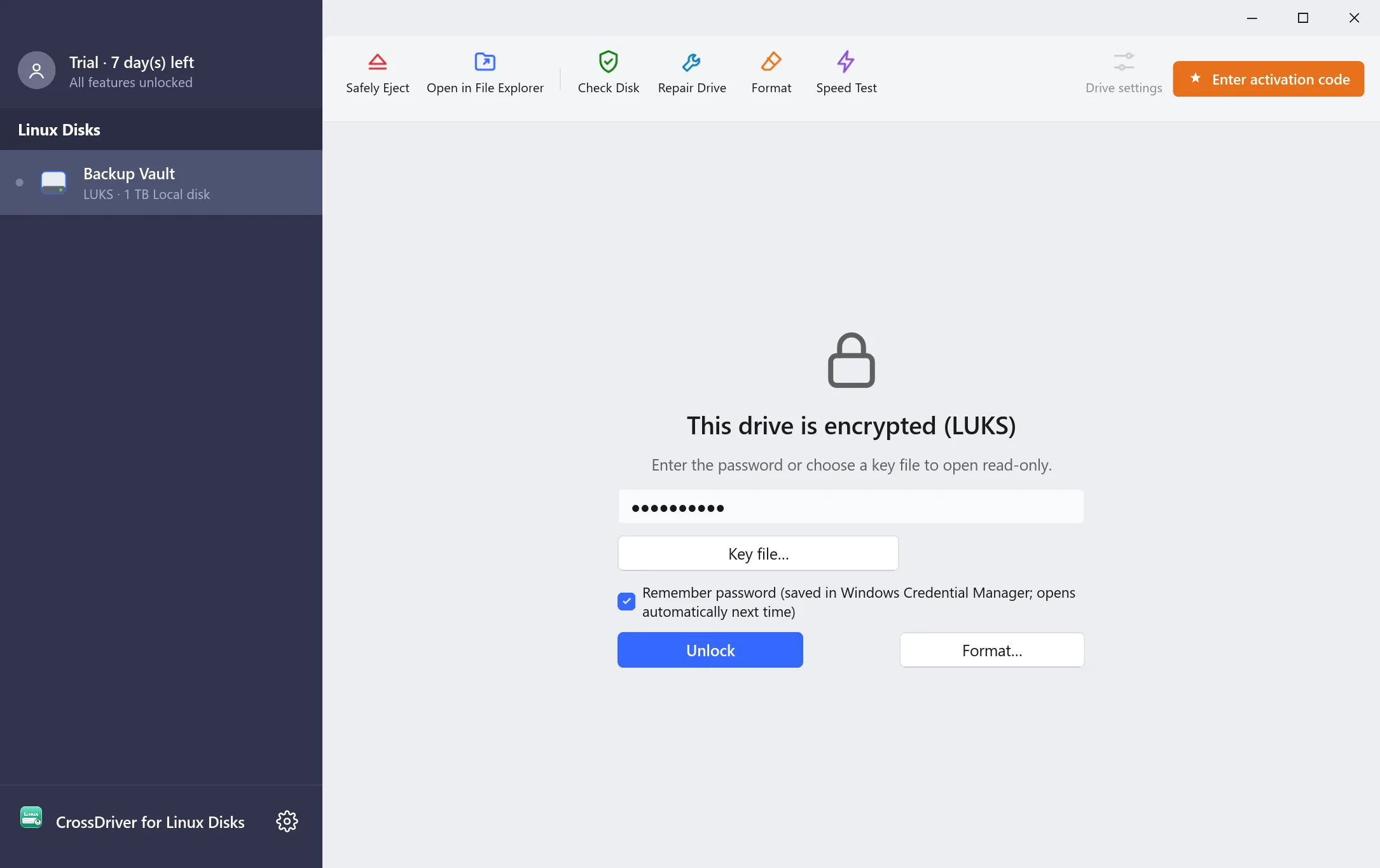
LUKS-encrypted drives open with their password

Detects LUKS1 / LUKS2 automatically; unlock with a password or a key file. Unlocking is a Pro feature; try it free for 7 days first.

  • 1Detects LUKS2 automatically
  • 2Password
  • 3Or a key file
  • 4Save in Windows Credential Manager
CrossDriver for Linux Disks (Ext4 / XFS / Btrfs for Windows (read Linux drive on Windows)) screenshot: Detects LUKS2 automatically; Password; Or a key file; Save in Credential Manager
1Detects LUKS2 automatically
2Password
3Or a key file
4Save in Credential Manager
04Pro

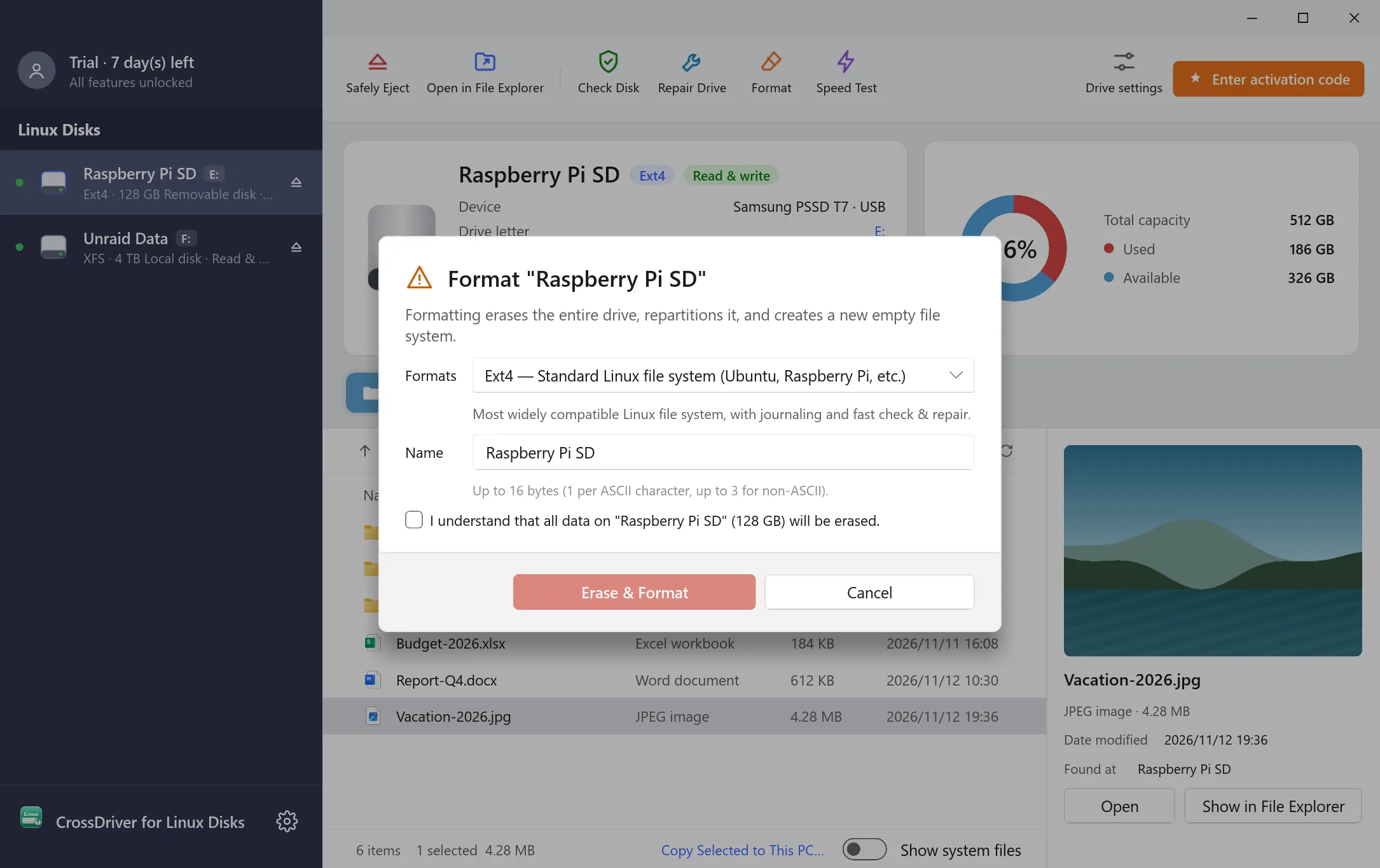
Format as Ext4, XFS, Btrfs or exFAT

Prepare drives for a Raspberry Pi, Linux PC or NAS right on Windows.

  • 1Choose from four formats, with what each is for alongside
  • 2Check to confirm before erasing
CrossDriver for Linux Disks (Ext4 / XFS / Btrfs for Windows (read Linux drive on Windows)) screenshot: Choose from four formats; Check to confirm before erasing
1Choose from four formats
2Check to confirm before erasing
Smart detection

Recognizes every drive and recommends the right app

🗄

NAS array member drives

A single member drive of a Synology SHR / RAID can't be opened on its own: for Linux Disks recognizes it and asks you to connect every drive of the same array and hand them to Data Recovery NAS for read-only recovery.

↺

Damaged drives, or drives asking to be formatted

A corrupted file system or deleted files: recover read-only with Data Recovery first, then think about repairing.

⇄

Drives in use by another app

A drive Data Recovery is scanning shows "In use by Data Recovery" and can be handed over when the scan ends.

Compare

for Linux Disks or Omni?

Omni includes everything in for Mac Disks and for Linux Disks, and also supports ZFS and F2FS.

for Linux Disksfor Mac DisksOmni
Read & write Ext4, XFS, Btrfs✓—✓
LUKS unlock✓—✓
APFS, HFS+, Time Machine—✓✓
ZFS, F2FS——✓
Check & repairExt4 · XFS—Ext4 · XFS
Pro license works withfor Linux Disksfor Mac DisksAll three apps
Works with

Works with mainstream PCs and drives of every brand

PCs

System
Windows 10 2004 (19041) and later, Windows 11; Home, Pro and Education are all supported
Processor
x64 (Intel, AMD) and ARM64 (e.g. Snapdragon); one installer that picks the right one when installing
Type
Desktops, laptops, mini PCs; running in a virtual machine or cloud desktop needs nested virtualization

Supported disks

Formats
Ext2 / Ext3 / Ext4, XFS, Btrfs, LUKS encryption
Type
Raspberry Pi SD / TF cards, USB flash drives, external drives, and SATA / NVMe drives in an enclosure
Connection
USB-A, USB-C, Thunderbolt, card readers, drive enclosures, docking stations; USB flash drives and card readers supported as well

Common uses

Raspberry Pi
The system partition on an SD card is shown together with its FAT32 boot partition
Linux and servers
Ext4, XFS data drives
Unraid
Single XFS / Btrfs data drives
Encrypted drives
Ubuntu, Fedora LUKS-encrypted drives

For NAS storage pools spanning multiple disks, use Data Recovery NAS.

How it works

No kernel driver:
Windows' own Virtual Machine Platform

CrossDriver reads and writes Ext4, XFS and Btrfs drives with native Linux file system drivers inside an isolated, lightweight Linux virtual machine, then hands the volumes to File Explorer as drive letters. The virtual machine runs on Windows' built-in Virtual Machine Platform; no kernel driver is installed.

✓ No kernel driver

A built-in Windows component

Just turn on Windows' built-in Virtual Machine Platform and restart once the first time. Windows Home has it too.

✓ One engine

One virtual machine, however many apps

All five apps share one background service and one virtual machine: no fighting over drives and resources used only once. When no drive needs serving, the virtual machine stops by itself.

✓ Safe eject

Everything's written before you unplug

Click "Safely eject" in the app or the taskbar tray: the engine first writes every change back to the disk, then tells you it's safe to unplug.

Requirements: Windows 10 2004 (19041) or later, x64 and ARM64, virtualization enabled in the BIOS. When Windows itself runs in a virtual machine, nested virtualization must be turned on.

Pricing

Look for free first, upgrade when you need to write

The free edition opens drives read-only to browse, preview and copy to your PC, with no time limit. Pro can be tried free for 7 days in the app.

Free

US$0

  • Detects and opens Linux drives automatically
  • Read-only access in File Explorer
  • Preview, copy to your PC
  • Check Disk
Free download · Includes 7-day Pro trial
Recommended

for Linux Disks Pro

US$29.95 Lifetime license · 1 year US$19.95 · 1 month US$9.95

  • Everything in Free
  • Read & write Ext4, XFS, Btrfs
  • Repair file systems
  • Format as Ext4, XFS, Btrfs, exFAT
  • Unlock LUKS-encrypted disks
Buy Pro

Omni Pro (Complete Bundle)

US$49.95 Lifetime license · 1 year US$29.95 · 1 month US$14.95

  • Everything in for Mac Disks + for Linux Disks
  • Plus ZFS, F2FS
  • One license, three apps
Learn about Omni

Each license is for 1 PC and can be deactivated in the app to move it to another; works offline, no account needed. Lifetime licenses get free updates for life, including future major versions. Prices are in US dollars, purchased on crossdriver.com; Mac and Windows licenses are separate. After-sales and refund policy. Each code can be moved to another computer 3 times on your own; after that, contact support.

FAQ

Q&A

Can Windows read Ext4?

Windows doesn't support Ext4, XFS or Btrfs on its own and will say the disk needs formatting — click "Cancel". With for Linux Disks installed, these drives appear in File Explorer as drive letters: read-only in the free edition, read-write with Pro.

Can I edit a Raspberry Pi SD card on Windows?

Yes. The Ext4 system partition on the SD card appears as a drive letter and the FAT32 boot partition is shown in for Linux Disks too; with Pro you can edit configuration files and copy programs onto it directly.

How is it different from WSL's wsl --mount?

wsl --mount works from the command line, and the mounted drive lives inside WSL's Linux environment. for Linux Disks opens drives automatically when plugged in, with File Explorer drive letters, check and repair, formatting and LUKS unlocking, and works with USB flash drives and card readers too. When a drive is in use by WSL, Ext2Fsd or other software, CrossDriver tells you who is using it instead of grabbing it.

Can it read Unraid drives?

Yes. Each data drive in an Unraid array is an independent XFS or Btrfs file system and opens on its own.

Can Synology drives be opened with for Linux Disks?

Synology data usually sits on SHR / RAID and LVM, so a single drive can't be opened. for Linux Disks recognizes it as a NAS array member; connect every drive of the same storage pool and recover read-only with Data Recovery NAS.

Why do I have to restart the first time?

CrossDriver runs the engine that reads and writes drives on Windows' built-in Virtual Machine Platform component. It's off by default; the installer or the first-launch page walks you through turning it on, after which one restart is needed — and never again. Steps: Turn on Virtual Machine Platform.

Does it install a kernel driver?

No. CrossDriver installs no file system driver or any other kernel driver: drives are read and written by an isolated, lightweight Linux virtual machine and then appear in File Explorer as drive letters. The background service only starts when a CrossDriver app needs it, and uninstalling the last CrossDriver app removes the service, the tray helper and the virtual machine image together.

Do the drive letters stay after I close the app?

Yes. After you close the app, the drives it opened stay available through the background service and keep their drive letters; before unplugging, click "Safely eject" in the CrossDriver menu of the taskbar tray.

Is "Disconnect" on a network drive in File Explorer the same as ejecting?

No. CrossDriver's drive letters appear as network locations; before unplugging, click "Safely eject" in the app or tray menu: the engine first writes changes back to the disk, then tells you it's safe to unplug.

Can I try Pro first?

Yes. for Mac Disks, for Linux Disks and Omni all let you try Pro free for 7 days in the app. When the trial ends the drives remain readable and your files are unaffected.

I bought the Mac version. Do I need to buy the Windows version too?

Yes. Mac and Windows licenses are separate; a discounted bundle for both is coming soon.

Linux drives, read and written on Windows

Download CrossDriver for Linux Disks and open your drive for free.

Windows 10 2004 or later · x64 and ARM64 · Privacy policy · Pricing · Open-Source Licenses

Downloads are counted anonymously; no personal information is recorded.